Storefronts
A storefront is a complete "outfit" for your store — a theme, its pages, and its menus, bundled together. You can keep more than one (an everyday version and a holiday version, say) and switch which one your customers see. Only one is live at a time.
Where to find it
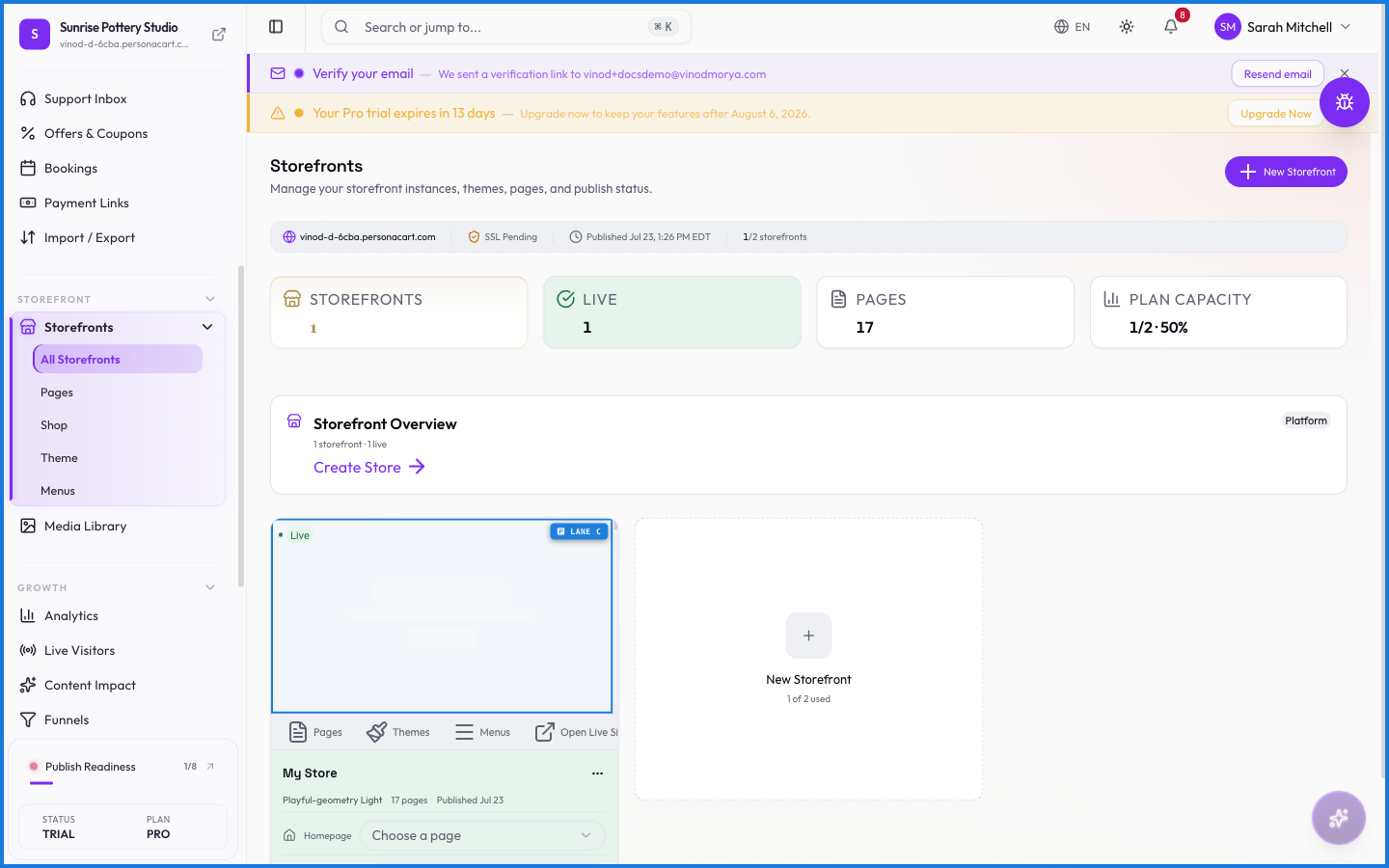
Sidebar → STOREFRONT → Storefronts (the "All Storefronts" view).
What you see
An infrastructure strip under the header shows your primary domain, your SSL status (Valid or Pending), and when the live storefront was last published. Below that, each storefront is a card you can open to edit its pages, theme, and menus. New Storefront creates another — up to your plan's limit.
Publishing
Going live runs through a readiness checklist first — required checks (like a payment method connected) and recommended ones. Once the required checks pass, the Publish Store button turns on. Publishing makes that storefront the one buyers see at your domain.
What happens — and what doesn't
- Only one storefront is live at a time. Switching the live one swaps what every visitor sees, instantly.
- Editing a non-live storefront is safe — customers keep seeing the live version until you publish the change.
- SSL is provisioned for you; the strip shows Pending until it's ready, then Valid.
- Your plan caps how many storefronts you can create; the New button reports the limit when you hit it.
Can I have more than one storefront?
Yes, up to your plan's limit. Each is a full theme-pages-menus bundle. Only one can be live at a time, and you choose which.
What do I need before publishing?
Your store runs a readiness checklist. Required checks — like a connected payment method — must pass before the Publish Store button activates. Recommended checks are optional but advised.
Will editing a storefront change my live site immediately?
Only if you're editing the live storefront and publish. Edits to a non-live storefront don't affect customers until you make it live.
What this screen looks like in every state
| State | When you'll see it | What you see, and what to do |
|---|---|---|
| Loading | The screen is fetching your data | A skeleton in the shape of the finished page. It should be brief — if it persists, the load has failed rather than stalled. |
| Error | The data couldn't be loaded | A message with a retry. Retry first: most of these are a dropped request, not a broken store. If it repeats, the outage is upstream and reloading won't help. |
| No access | Your role doesn't include this screen | A permission notice instead of the page. An owner or admin can grant access under Settings → Team. |
When something goes wrong
These are the messages this screen can show you, and what each one means.
| If you see | What to do |
|---|---|
| At least one payment method must remain enabled | The payment provider rejected it. Check your gateway connection under Settings → Payments. |
| Copy failed — please copy manually | Retry the action. If it keeps happening, contact support with what you were doing. |
| Copy failed — select the URL manually | Retry the action. If it keeps happening, contact support with what you were doing. |
| Could not start Stripe onboarding. Backend returned no authorization URL. Please try again or contact support. | The payment provider rejected it. Check your gateway connection under Settings → Payments. |
| Could not switch Stripe environment. Please try again. | The payment provider rejected it. Check your gateway connection under Settings → Payments. |
| Enter your test or live credentials first. | Do what the message asks, then try again — it names exactly what's missing. |
| Failed to disconnect. Please try again. | The change didn't save. Retry — if it keeps failing, the request isn't reaching the server. |
| Failed to generate Stripe link | The payment provider rejected it. Check your gateway connection under Settings → Payments. |
| Failed to save | The change didn't save. Retry — if it keeps failing, the request isn't reaching the server. |
| Failed to update auto-convert setting | The change didn't save. Retry — if it keeps failing, the request isn't reaching the server. |
| Failed to update payment method | The payment provider rejected it. Check your gateway connection under Settings → Payments. |
| Please fix the tax-ID format errors before saving. | Do what the message asks, then try again — it names exactly what's missing. |
| You set … as the active mode but did not enter … credentials. | Retry the action. If it keeps happening, contact support with what you were doing. |
Every field on this screen
Every control here, read straight from the live app.
| Field | Type | What it accepts | What it does |
|---|---|---|---|
| /sale or /seasonal | Text | — | |
| After Label | Text | — | |
| Alt Text * | Text | — | |
| article-url-slug | Text | — | |
| Before Label | Text | — | |
| Brief summary of the post | Text | — | |
| Call to Action | Text | — | |
| Category | Dropdown | — | |
| Collection Name | Text | — | |
| Column {number} heading | Text | — | |
| Comparison Features | Text | — | |
| CTA Text | Text | — | |
| Customer Name | Text | — | |
| Customer Quote | Text | — | |
| Date & Time | Date |
| |
| Discount % | Slider | — | |
| Display Label | Checkbox | — | e.g. Menu item label |
| Filename | Text | — | |
| Left Product | Text | — | |
| Menu item label | Text | — | |
| Meta description for search engines | Text | — | |
| Name | Text | — | e.g. e.g., Summer 2025, Holiday Edition |
| New Name | Text | — | |
| Open in new tab | Text | — | e.g. /sale or /seasonal |
| Original Price | Text | — | |
| Page Type | Dropdown | — | |
| post-url-slug | Text | — | |
| Price | Text | — | |
| Product Name | Slider | — | |
| Product Title | Text | — | |
| Products | Text | — | |
| Rating | Text | — | |
| Review Text | Text | — | |
| Reviewer Name | Text | — | |
| Right Product | Text | — | |
| Sale Price | Text | — | |
| Sale Text | Slider | — | |
| Search articles | Text | — | |
| Search collections | Text | — | |
| Search pages | Text | — | |
| Search posts | Text | — | |
| Search products | Text | — | |
| Security Policy | Choice | — | |
| Sort | Dropdown | — | |
| Status | Dropdown | — | |
| Store Name | Text | — | |
| Subtitle | Text | — | |
| Tagline | Text | — | |
| Tags * | Tags | — | e.g. Add a tag... |
| Target Collection | Text | — | e.g. Search collections... |
| Target Page | Text | — | e.g. Search pages... |
| Target Product | Text | — | e.g. Search products... |
| Title | Dropdown | — | Choices: CrossfadeSlideZoom |
| Transition Style | Dropdown | — | Choices: CrossfadeSlideZoom |
| Type | Dropdown | — | |
| URL | Checkbox | — | e.g. https://example.com |
| URL Path | Text | — | e.g. /sale or /seasonal |
| Variants | Text | — |
58 fields, read from the live app. Which ones you see depends on the product type and your plan.