Tracking and analytics
In short: Add your Facebook (Meta) Pixel, Google Analytics and Tag Manager IDs, and connect Google Search Console. IDs are checked before saving.
Tracking connects your store to the ad and analytics tools you already use. You paste an ID, press Save, and your store starts telling that tool about visits and purchases. If you do not run ads, you can skip this page: your store works without it.
Where to find it
- Sidebar → SETTINGS → Visitors and Google (the rows Google Analytics, Tag Manager, Meta pixel and Search Console all open this page).
- It is free on every plan.
- You need the storefronts permission to change it; only the owner or an admin can change the IDs.
- The page says:
Add your IDs, then press Save. Nothing changes on your store until you do.
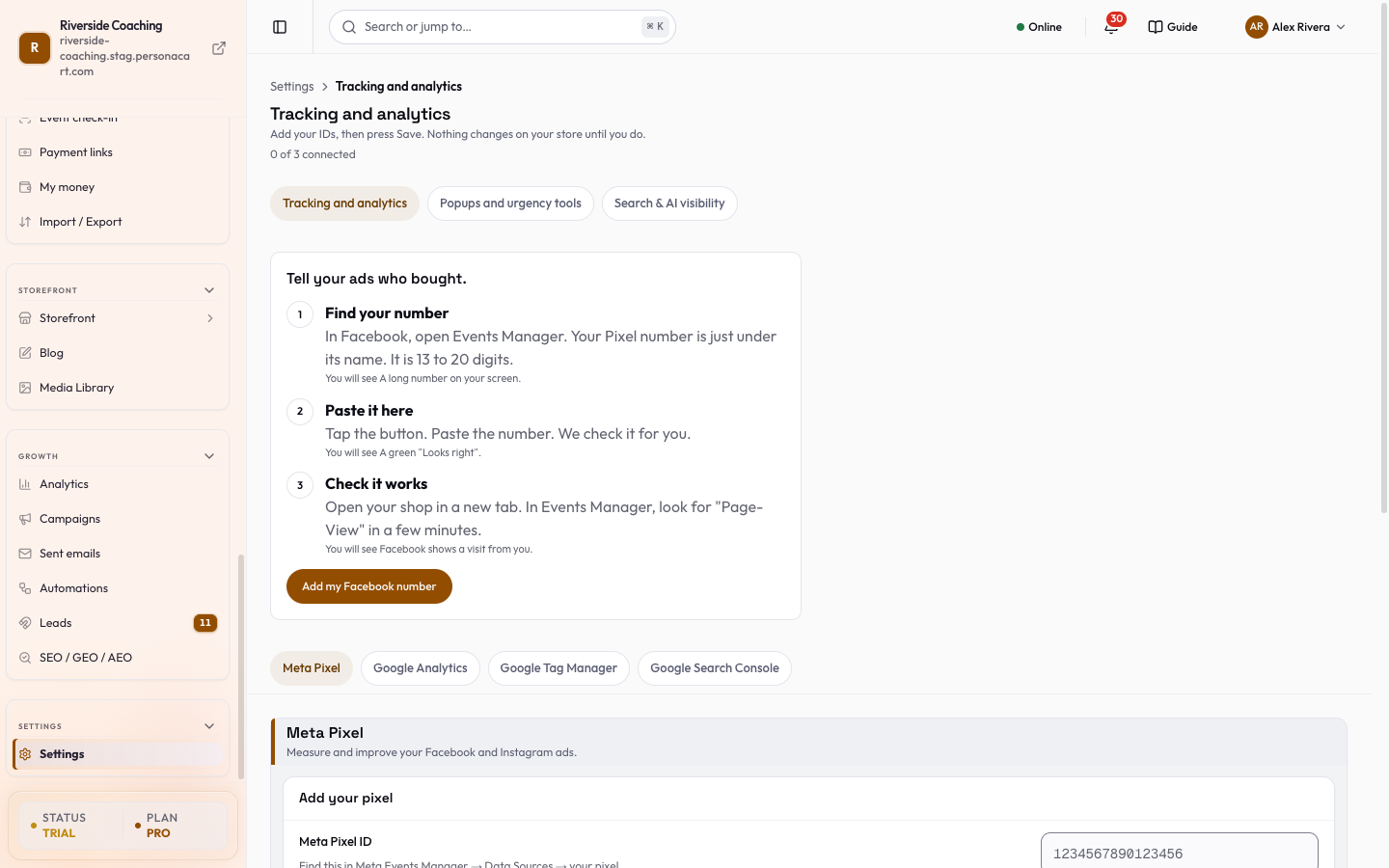
Meta Pixel (Facebook and Instagram ads)
A card Do you run ads on Facebook or Google? (Paste one number and your ads learn who buys. 2 minutes.) starts the guided flow:
- Find your number. In Facebook, open Events Manager. Your Pixel number is just under its name. It is 13 to 20 digits.
- Paste it here. Press Add my Facebook number, paste the Pixel number (13 to 20 digits) and the page checks it.
- A green Looks right appears when it is valid.
- Problems are named in plain words:
Paste your Pixel number first.,Only digits, please. Remove the letters and spaces.,A Pixel number has 13 to 20 digits.
- Check it works. Open your shop in a new tab. In Events Manager, look for
PageViewin a few minutes. (PersonaCart cannot see that from here.)
- The sheet summarises what happens when you save: the number is saved; your shop starts telling Facebook about visits and purchases, and nothing new is shown to your customers; remove the number to stop, and it takes effect right away.
- After saving, Undo is available.
- If you already have your number, you can also paste it into the Meta Pixel ID field of the section directly (
Find this in Meta Events Manager → Data Sources → your pixel).
More services: Google Analytics and Tag Manager
More services (Google Analytics and Tag Manager. Most people only need the Facebook number.) opens when either has a value.
| Section | Field | Format and where to find it |
|---|---|---|
Google Analytics (See who visits your store and what they do.) | GA4 Measurement ID | G- followed by 8 to 12 letters or numbers, for example G-ABC123XYZ9. Google Analytics → Admin → Data Streams → your storefront stream. |
Google Tag Manager (One container that holds all your other tracking tags.) | GTM Container ID | GTM- followed by 6 to 10 letters or numbers, for example GTM-ABC1234. At the top of the workspace in Tag Manager, beside the workspace selector. |
IDs are trimmed, and Google IDs are saved in capitals. A wrong format shows an error and is not saved. An empty field is valid and clears the saved ID.
Saving
Typing changes nothing on the server. One Save bar at the bottom sends only the fields you changed (N unsaved changes, then Saved). Discard puts the saved values back. Leaving the page with unsaved IDs asks first. If saving fails, Couldn't save. Your changes are still here.
Google Search Console
Google Search Console (See what people searched for on Google before they found your store.) is its own connection, and its buttons act at once.
- Press Connect Search Console and sign in to Google in the window that opens. If your browser blocks the window, allow pop-ups for the site and try again.
- PersonaCart shows the connected account (
Connected as <email>) and your Site. - Verify with Pie adds your store to Search Console, verifies it and sends your sitemap (Set up for you). Change site picks a different site. If setup fails the button reads Try again.
- If sign-in expires the card shows Needs sign in with Sign in to Google. Google may also ask for one more permission so Pie can add and verify your site: reconnect once.
- Disconnect asks first.
Search results links to Search & AI visibility, where your clicks, searches and positions are shown.
Good to know
Tracking scripts respect your visitors' cookie consent. Events only fire after a visitor accepts marketing cookies.
- Nothing is shown to your customers. Tracking only sends visit and purchase events to your own ad or analytics account.
- Removing an ID stops tracking right away.
Questions
Do I need a Pixel or Google Analytics?
Only if you run ads or want visitor reports there. Your store works without them.
Where do I find my Meta Pixel number?
In Meta Events Manager, under Data Sources, on your pixel. It is 13 to 20 digits.
Why do I see no PageView in Events Manager?
Tracking events fire only after a visitor accepts marketing cookies. Accept them on your own store first, then check again in a few minutes.
Does Search Console cost anything?
No. It is Google's free tool. Connecting it lets Pie show how your store appears in Google search.
Related
Part of Store Settings Guide · Product page: PersonaCart features