Text messages
In short: Send class reminders and changes by text through your own Twilio account: setup, who gets texts, quiet hours, STOP and sending limits.
- PersonaCart can text the families and customers of your store about their classes: a reminder before a session, and a text when a session is moved or cancelled.
- Texts go out through your own Twilio account.
- This page covers setup, who receives texts, and what protects you and them.
- It is not legal advice.
Where to find it
Settings → Tools you connect → Text messages. Only the owner or an admin can change these settings. Text messages also sits as a tab beside Connected apps and Video meetings.
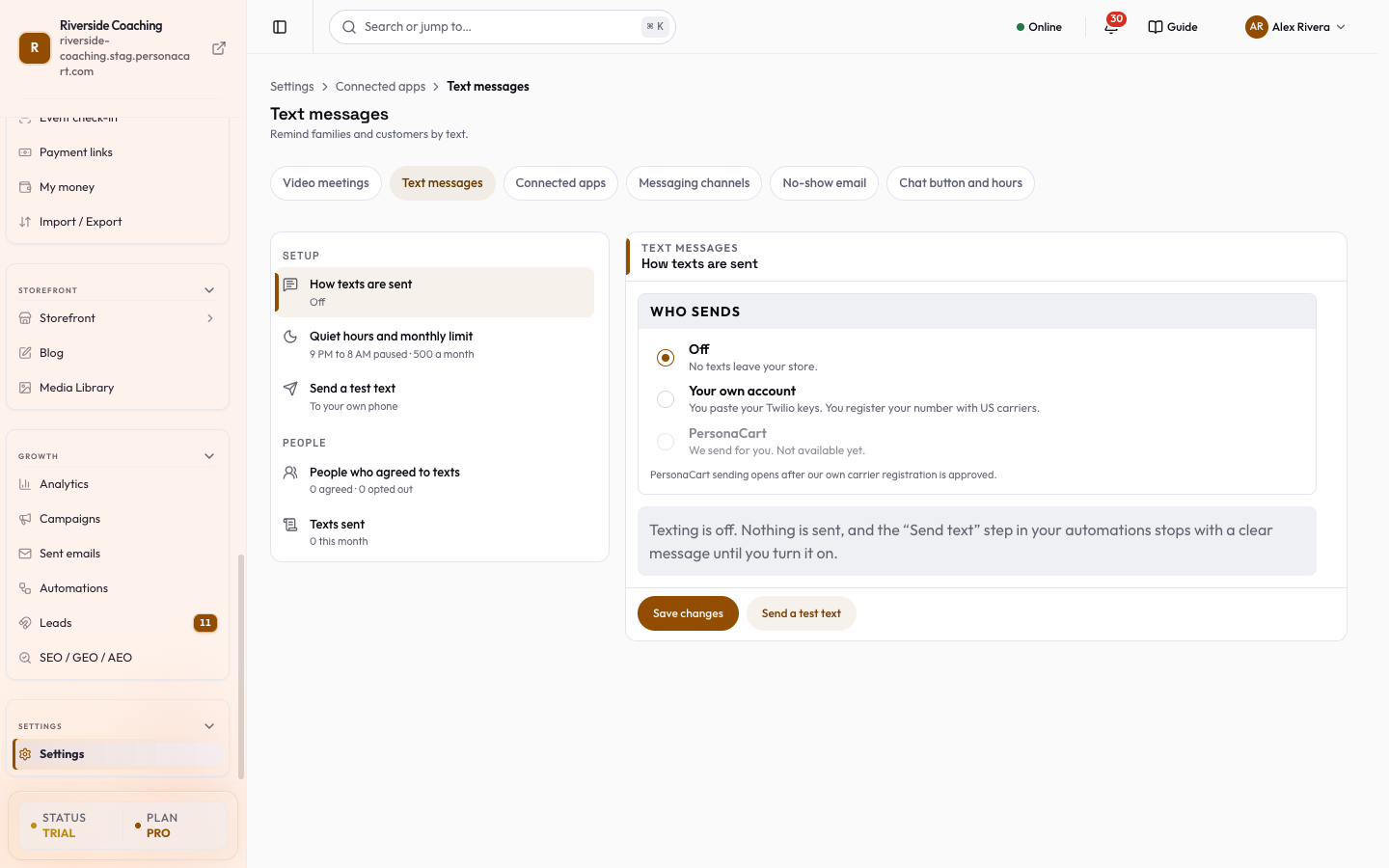
What is on the page
- A list of cards on the left, in two groups. The card you pick opens on the right.
- Save changes saves the How texts are sent and Quiet hours and monthly limit cards. Nothing changes until you press it.
- Setup: How texts are sent, Quiet hours and monthly limit and Send a test text.
- People: People who agreed to texts and Texts sent.
- Each card shows a one-line status, for example
Your own account · ready,9 PM to 8 AM paused · 500 a month,3 agreed · 1 opted outor12 this month.
Who sends
The first panel, How texts are sent, works like this:
- Off. No texts leave your store. This is how every store starts. The "Send text" step in an automation stops with a clear message while texting is off.
- PersonaCart. We would send for you with no account needed. It opens after PersonaCart's own carrier registration is approved, and until then the option says
Not available yet. - Your own account. You paste your Twilio Account SID, Auth token and the number (or messaging service) texts come from. The token is stored encrypted and is never shown again. To change keys, press Replace keys.
Carrier registration
- In the United States, texting from a normal 10-digit number needs registration with the carriers (A2P 10DLC).
- Registered senders get less filtering and higher speed; unregistered senders face more filtering and extra carrier fees.
- Do this in your Twilio console before you turn texting on; the registration is made in your Twilio account.
Replies: STOP and START
Under Replies (STOP and START) you will see an address. In Twilio, set "A message comes in" on your number to that address. When someone replies STOP, PersonaCart stops texting them at once; START turns texts back on. If Twilio has already blocked a number, PersonaCart notices and stops too.
Who gets texts
Only people who agreed. A person can agree in two ways:
- In their own account, under Account → Notifications → Academy, by entering their number and ticking the agreement. The store name, the kind of texts, "message and data rates may apply", how to stop, and "agreeing is not a condition of buying" are printed beside the button.
- You can add a person yourself under People who agreed to texts, after ticking that you hold a record of their agreement (a form, a message or a signed page). Only add people you really have a record for.
Your own number counts as agreed when you press Send test text in the Send a test text card. It texts your phone once with This is a test text from your store. Your texting is set up.
The same panel lists everyone who agreed or opted out, and how.
What is texted
Session reminders, and sessions that are moved or cancelled.
Quiet hours and limits
- Texts are never sent between 9 PM and 8 AM in the time zone of the person getting them. If PersonaCart does not know it, your store's time zone is used. A text that falls in that window waits and goes at 8 AM. The hours are fixed.
- Texts per month (default 500) stops sending once reached, so a mistake cannot send thousands. Raise it when you need to.
- Name at the start of each text is shown before the message, and every text ends with "Reply STOP to opt out."
Seeing what went out
Texts sent lists the last 100 texts as sent, failed or blocked (for example "has not agreed" or "monthly limit reached"), and this month's count against your limit.
Questions
Do texts start going out by themselves?
No. Texting is off for every store until you set it up. The Send text step in an automation stops with a clear message while texting is off.
Who gets a text?
Only people who agreed to receive texts. They agree in their own account, or you add them after ticking that you hold a record of their agreement.
When are texts sent?
Never between 9 PM and 8 AM in the time zone of the person getting them. A text in that window waits and goes at 8 AM.
What happens when someone replies STOP?
PersonaCart stops texting them at once. START turns texts back on.
Is there a limit on texts?
Yes. Texts per month defaults to 500 and sending stops when it is reached. You can raise it.
Related
Part of Store Settings Guide · Product page: PersonaCart features