Shipping
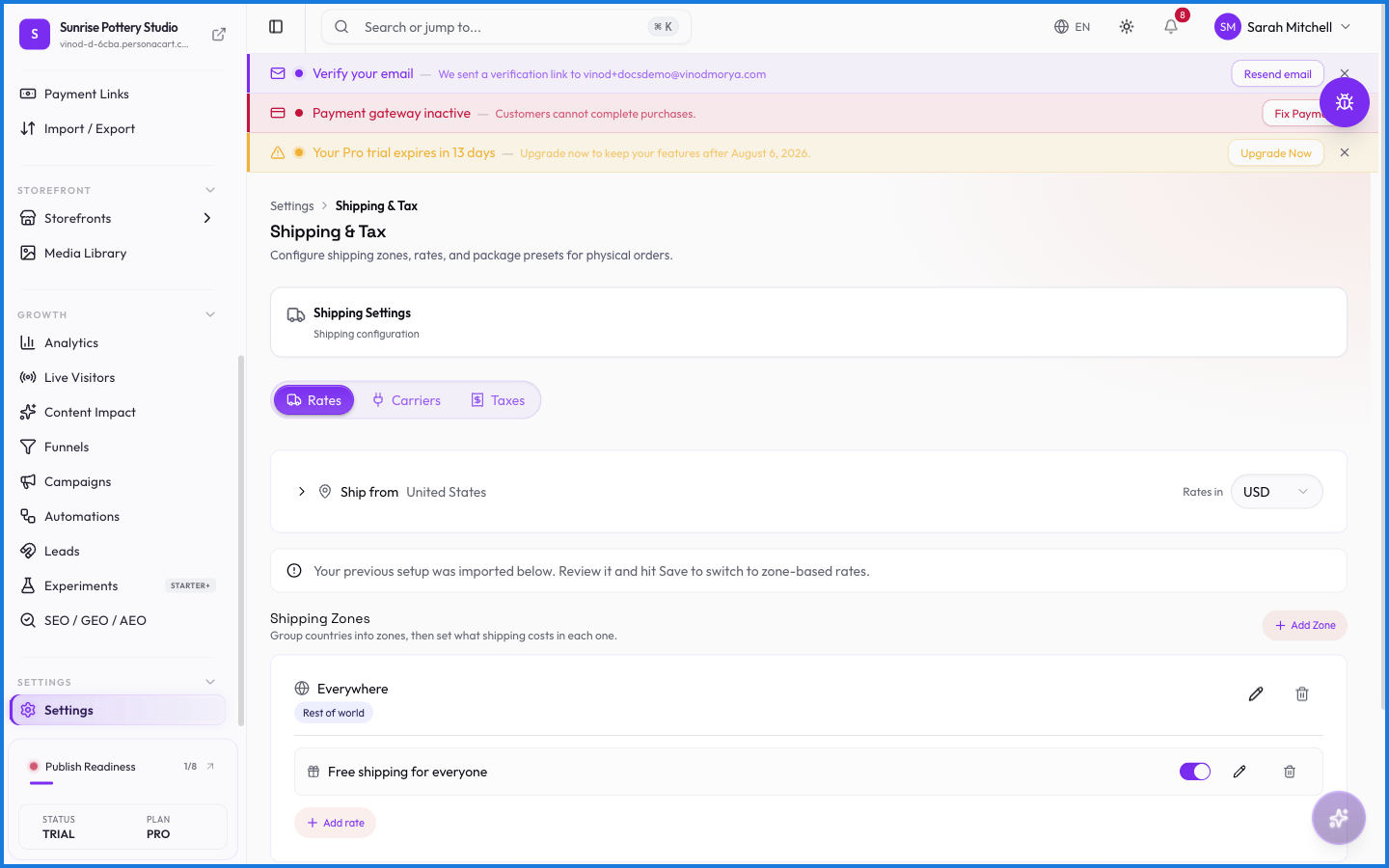
Shipping settings decide what buyers pay to receive physical goods. You set rates and the zones they apply to, and PersonaCart shows the right cost at checkout. Digital and course products skip all of this — there's nothing to ship.
Where to find it
Sidebar → SETTINGS → Settings → Shipping.
What happens — and what doesn't
- Shipping applies to physical products only — digital, course, and service orders never see a shipping charge.
- Rates can vary by zone, so buyers in different regions see different costs.
- The rate a buyer sees at checkout comes from these settings; a free-shipping offer can waive it.
- Shipping cost is added to the order total and shown before payment.
Do digital products have shipping?
No. Only physical products carry shipping. Digital downloads, courses, and services deliver without any shipping charge.
Can shipping cost differ by region?
Yes. You set rates per zone, so buyers in different regions see the delivery cost that applies to them.
Can I offer free shipping?
Yes — through an offer or pricing rule that waives the shipping charge, for example above a spend threshold.
Every field on this screen
Every shipping and tax field — rates, zones, and what buyers get charged to deliver. Read straight from the live app, so it matches what you see.
| Field | Type | What it accepts | What it does |
|---|---|---|---|
| 1-2 business days | Number | — | e.g. e.g. 7 |
| 221B Baker Street | Text | — | |
| 3-5 business days | Number | — | e.g. e.g. 7 |
| Address line 1 * * | Text | — | e.g. 221B Baker Street |
| Automatic Tax Calculation | On/off | — | |
| Carrier | Dropdown | — | Choices: All connected carriers |
| Cheapest per speed tier | Number | — | |
| City * * | Text | — | |
| Countries | Dropdown | — | |
| Custom | Number | — | e.g. e.g. 7 |
| ETA | Number | — | e.g. Ready in 2 hours |
| Handling fee | Text | — | |
| Handling Fee ($) | Number | — | |
| Height (cm) | Number | — | e.g. 20 |
| Hours | Text | — | e.g. Mon-Sat 10-7 |
| Label | Number | — | e.g. Standard |
| Label (optional) | Number | — | e.g. e.g. Free shipping |
| Length (cm) | Number | — | e.g. e.g. Small Box |
| Markup | Number | — | |
| Markup Type | Number | — | |
| Markup Value | Number | — | |
| Max days | Number | — | |
| Maximum order | Number | — | |
| Maximum rates to show | Number | — | |
| Min days | Number | — | |
| Minimum order | Number | — | e.g. e.g. 500 |
| Mon-Sat 10-7 | Text | — | |
| Name | Number | — | e.g. e.g. Small Box |
| Pickup fee (optional) | Number | — | |
| Postal code * * | Text | — | |
| Primary provider only | Number | — | |
| Rate | Number | — | |
| Rates in | Dropdown | — | |
| Ready in 2 hours | Text | — | |
| Rest of world | On/off | — | |
| Services | Checkbox | — | |
| Set as default preset | Number | — | e.g. 0.5 |
| Shipping section label | Text | — | |
| Show all rates | Choice | — | |
| Standard | Text | — | |
| Use for order fulfillment | On/off | — | |
| Use for rate calculation | On/off | — | |
| Weight (kg) | Number | — | e.g. 10 |
| Width (cm) | Number | — | e.g. 30 |
| Zone Name | On/off | — | e.g. e.g. India, North America, Europe |
45 fields, read from the live app. Which ones you see depends on the product type and your plan.
What this screen looks like in every state
| State | When you'll see it | What you see, and what to do |
|---|---|---|
| Loading | The screen is fetching your data | A skeleton in the shape of the finished page. It should be brief — if it persists, the load has failed rather than stalled. |
| Error | The data couldn't be loaded | A message with a retry. Retry first: most of these are a dropped request, not a broken store. If it repeats, the outage is upstream and reloading won't help. |
| No access | Your role doesn't include this screen | A permission notice instead of the page. An owner or admin can grant access under Settings → Team. |
When something goes wrong
These are the messages this screen can show you, and what each one means.
| If you see | What to do |
|---|---|
| Add at least one shipping zone before saving. | Do what the message asks, then try again — it names exactly what's missing. |
| All dimensions and weight must be valid numbers | The value isn't in the expected format. Check it against the field's rules above. |
| Each tier's min days must be ≤ max days. | You've hit a plan or rate limit. Wait a moment, or upgrade if you need the higher ceiling. |
| Every zone needs a name. | Retry the action. If it keeps happening, contact support with what you were doing. |
| Failed to add default packages | The change didn't save. Retry — if it keeps failing, the request isn't reaching the server. |
| Failed to add default tax rules | The change didn't save. Retry — if it keeps failing, the request isn't reaching the server. |
| Failed to create package | The change didn't save. Retry — if it keeps failing, the request isn't reaching the server. |
| Failed to create tax rule | The change didn't save. Retry — if it keeps failing, the request isn't reaching the server. |
| Failed to delete package | The change didn't save. Retry — if it keeps failing, the request isn't reaching the server. |
| Failed to delete tax rule | The change didn't save. Retry — if it keeps failing, the request isn't reaching the server. |
| Failed to disconnect provider | The change didn't save. Retry — if it keeps failing, the request isn't reaching the server. |
| Failed to save markup settings | The change didn't save. Retry — if it keeps failing, the request isn't reaching the server. |
| Failed to save settings | The change didn't save. Retry — if it keeps failing, the request isn't reaching the server. |
| Failed to test connection | A connectivity problem, not a problem with your store. Check your connection and try again. |
| Failed to update auto tax calculation setting | The change didn't save. Retry — if it keeps failing, the request isn't reaching the server. |
| Failed to update carriers | The change didn't save. Retry — if it keeps failing, the request isn't reaching the server. |
| Failed to update feature | The change didn't save. Retry — if it keeps failing, the request isn't reaching the server. |
| Failed to update package | The change didn't save. Retry — if it keeps failing, the request isn't reaching the server. |
| Failed to update tax rule | The change didn't save. Retry — if it keeps failing, the request isn't reaching the server. |
| Pick a currency before saving. | Do what the message asks, then try again — it names exactly what's missing. |
| Pickup needs: … | Retry the action. If it keeps happening, contact support with what you were doing. |
| Preset name is required | A required field is blank. Fill it in and save again. |
| Rates can't be negative. | Retry the action. If it keeps happening, contact support with what you were doing. |
| That pincode/ZIP doesn't look valid for the selected country. A correct origin pincode is required for carriers (e.g. Shiprocket, Delhivery) to calculate live rates. | A required field is blank. Fill it in and save again. |