Are my emails arriving?
In short: Check your sending domain (SPF, DKIM, DMARC) and your sending health: delivered, bounce and spam rates, and whether marketing email is paused.
This page shows whether your store's emails reach inboxes. It has two cards side by side under Is your email arriving?:
- Sending domain: the DNS records that prove emails really come from you.
- Sending health: how Gmail, Outlook and other mailbox providers see your emails.
Where to find it
Sidebar → Settings → Are my emails arriving?. It is one of the tabs at the top of the Settings email pages, next to Email templates, Sender & replies and Domains.
It is available on every plan, and it is read-only apart from Check again. The same two cards also appear inside Email templates.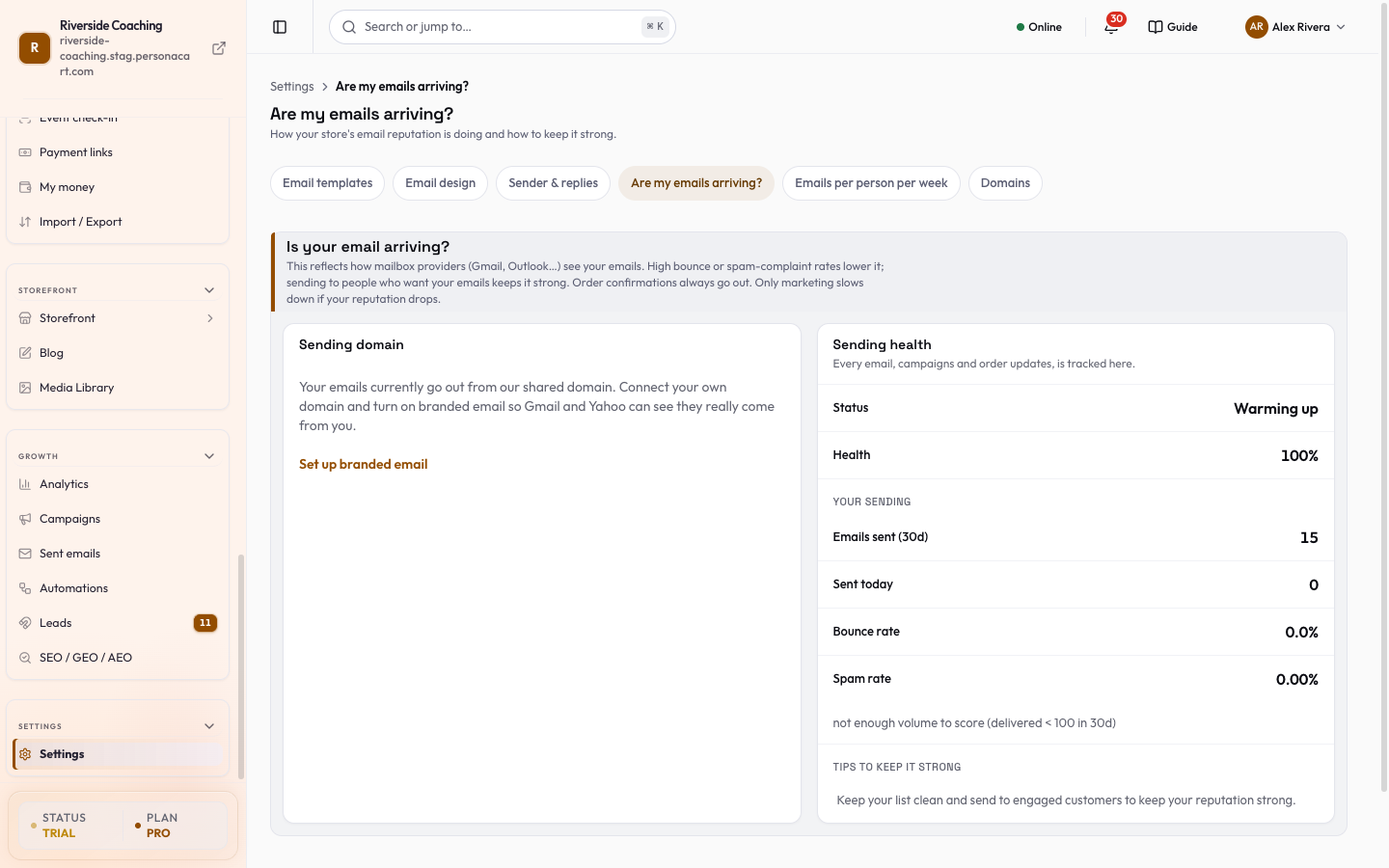
Sending domain
The card is titled Sending domain. If you have not connected your own domain, it says your emails go out from a shared domain. Press Set up branded email and it opens Domains, where you add your own.
When a domain is connected, three records are checked, each with a status (OK, Not found, or Monitoring only) and its Type, Name and Value with a Copy button:
| Record | What it is for |
|---|---|
| SPF | Lists the services allowed to send email for your domain. |
| DKIM | Adds a signature that proves an email was not changed on the way. Gmail and Yahoo can block marketing emails without DKIM. |
| DMARC | Tells inboxes what to do with fake emails and sends you reports. A record that only watches (p=none) shows Monitoring only and blocks nothing yet. |
Once a domain is connected, press Check again to look up your DNS records now. DNS changes can take a while to show up. While you are still sending from PersonaCart's authenticated domain, the card tells you these records do not affect delivery yet, and that adding them now gets you ready.
Sending health
- Status (for example Warming up on a new store) and Health (a percentage).
- Your sending: Emails sent (30d), Sent today, Bounce rate and Spam rate. A new store shows a note that there is not enough volume to score yet.
- A high bounce or spam rate is flagged. Tips to keep it strong follow. The card covers every email: campaigns and order updates both count.
- If your reputation drops, a banner says
A quick look at your email delivery. If marketing is paused it saysMarketing is paused while your delivery recovers. Order emails keep going out.Order confirmations always go out. Only marketing slows down.
Sending to people who want your emails keeps health strong. High bounce or spam-complaint rates lower it.
Good to know
- A new store with no sends has a blank record. That is normal.
- Anyone who reports you as spam or whose address bounces lowers your rate. PersonaCart stops emailing addresses that do not exist.
- Change the sender name and reply address in Sender & replies; change how often one person can be emailed in Emails per person per week.
Why is marketing paused?
Your bounce or spam rate got high, which hurts delivery for everyone. Marketing resumes as your delivery recovers. Order emails keep going out the whole time.
Do I have to add SPF, DKIM and DMARC?
Only if you send from your own domain. Until you switch, emails go from PersonaCart's authenticated domain and these records do not affect delivery.
What does Monitoring only mean for DMARC?
The record watches and reports but does not block anything yet.
Related
Part of Store Settings Guide · Product page: PersonaCart features