Cart & checkout
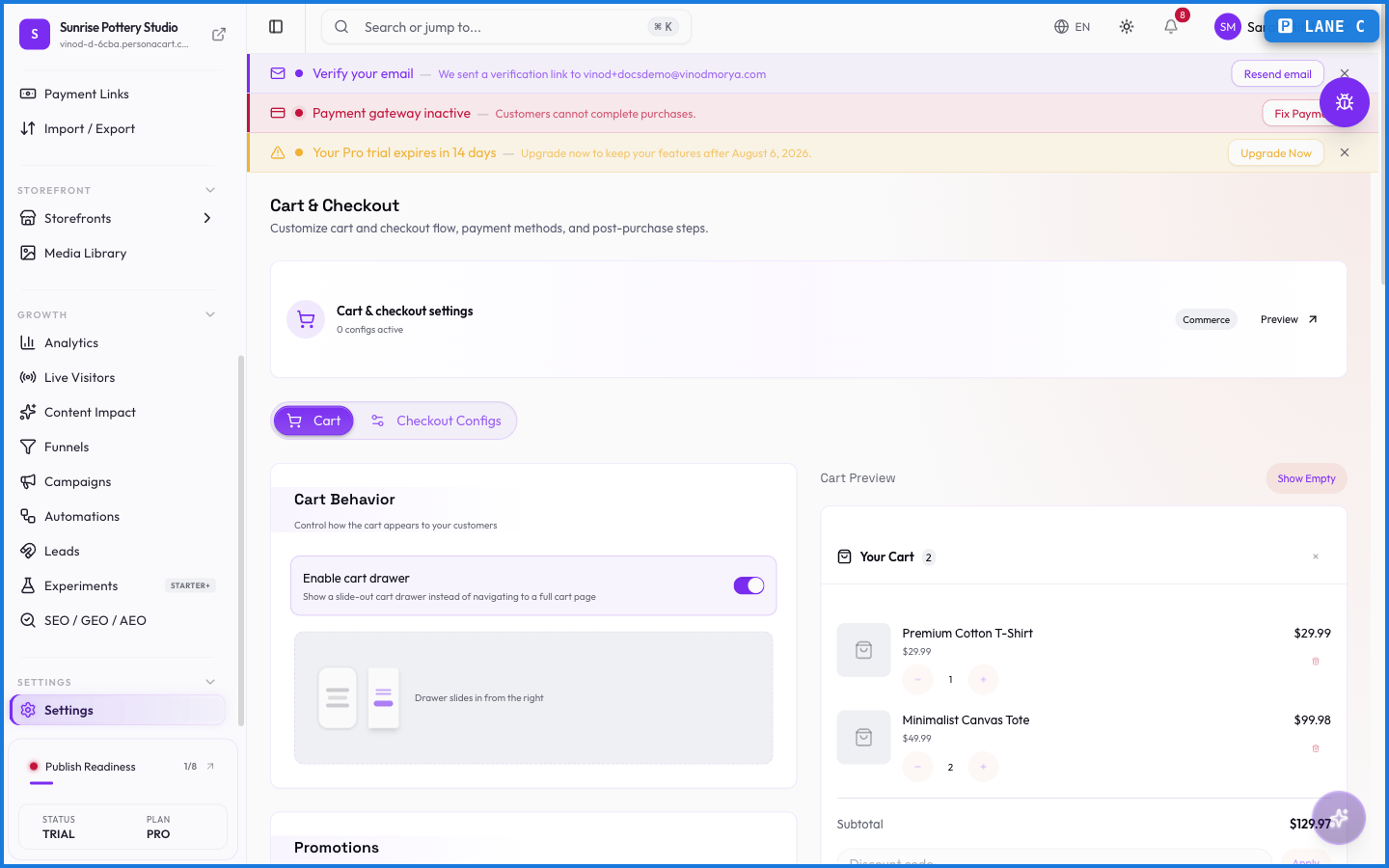
Cart & checkout settings shape the last, most important stretch of a sale — the cart and the checkout form. Small choices here (which fields you ask for, what the cart drawer shows) affect how many buyers actually finish.
Where to find it
Sidebar → SETTINGS → Settings → Cart & Checkout.
What happens — and what doesn't
- These settings control the buyer-facing cart and checkout — the experience shoppers actually move through.
- Fewer required fields usually mean fewer drop-offs; your Funnels show whether checkout is where buyers leave.
- Checkout configurations here are what payment links attach to.
- Coupons at checkout follow your Offers & Coupons rules — one coupon per checkout.
How can I reduce checkout drop-off?
Trim required fields and keep the flow simple. Your Funnels page shows if checkout is where buyers leave, so you can target the friction.
How does this connect to payment links?
Payment links attach to a checkout configuration set here, which controls the fields and options the buyer sees on the payment page.
Every field on this screen
Every field controlling the cart and the checkout your buyers go through. Read straight from the live app, so it matches what you see.
| Field | Type | What it accepts | What it does |
|---|---|---|---|
| 30-day money-back guarantee | Text | — | |
| Abandoned Cart Delay (minutes) | Number |
| |
| Accent color override | Text | — | |
| Allow buyer currency picker | On/off | — | |
| Allow coupons | On/off | — | |
| Allow gift cards | On/off |
| |
| Background color | Text | — | |
| Billing address * | Dropdown | — | Choices: AlwaysNeverRequiredOptionalHidden |
| Button text | Text | — | |
| Checkout button text | Text | — | |
| Checkout name | Choice | — | |
| Checkout type | Choice | — | |
| CTA link | Text | — | |
| Delay (seconds) | Number |
| |
| Discount code | Text | — | |
| Empty cart CTA | Text | — | |
| Empty cart message | Text | — | |
| Enable cart drawer | On/off | — | |
| Enable Gift Wrapping | Number | — | |
| Font family | Text | — | |
| Free returns within 14 days | Text | — | |
| Gift Wrap Fee ($) | Number |
| |
| Inherit store branding | On/off | — | |
| Max items per order | Number |
| |
| Maximum Order Amount ($) | Number |
| |
| Minimum Order Amount ($) | Number |
| |
| Order notes | Long text |
| e.g. Add a note to your order... |
| Phone * | Dropdown |
| Choices: RequiredOptionalHidden |
| Redirect URL | Number |
| e.g. https://example.com/thank-you |
| Require login | Number | — | |
| Shipping address | Dropdown | — | Choices: OptionalHiddenAuto (physical items)AlwaysNever |
| Ships in 2-3 business days | Text | — | |
| Show discount code field | On/off | — | |
| Show guarantee badge | On/off | — | |
| Show logo on checkout | On/off | — | |
| Show order notes | On/off | — | |
| Show order summary | On/off | — | |
| Show related products | On/off | — | |
| Show return policy badge | On/off | — | |
| Show shipping estimate | On/off | — | |
| Show SKU on storefront | On/off | — | |
| Show stock status on storefront | On/off | — | |
| Show terms & conditions | On/off | — | |
| Show trust badges | On/off | — | |
| Success heading | Long text | — | |
| Success message | Long text | — | |
| Terms link URL | Text | — | |
| Terms text | Text | — |
48 fields, read from the live app. Which ones you see depends on the product type and your plan.
What this screen looks like in every state
| State | When you'll see it | What you see, and what to do |
|---|---|---|
| Empty | You haven't created anything here yet | “No checkout configurations” — with a shortcut to create the first one. Nothing is wrong; there's just nothing to show yet. |
| Loading | The screen is fetching your data | A skeleton in the shape of the finished page. It should be brief — if it persists, the load has failed rather than stalled. |
| Error | The data couldn't be loaded | A message with a retry. Retry first: most of these are a dropped request, not a broken store. If it repeats, the outage is upstream and reloading won't help. |
| No access | Your role doesn't include this screen | A permission notice instead of the page. An owner or admin can grant access under Settings → Team. |
When something goes wrong
These are the messages this screen can show you, and what each one means.
| If you see | What to do |
|---|---|
| Checkout button text cannot be empty | A required field is blank. Fill it in and save again. |
| Empty cart CTA cannot be empty | A required field is blank. Fill it in and save again. |
| Empty cart message cannot be empty | A required field is blank. Fill it in and save again. |
| Minimum order amount cannot exceed maximum order amount | You've hit a plan or rate limit. Wait a moment, or upgrade if you need the higher ceiling. |