Grow
In short: Grow is Pie's plan for the moments ahead: festivals, shopping dates and tax deadlines where you sell, and the drafts Pie prepared. Also holds Customers.
Grow answers "where does the next sale come from?" It lists the dates that matter to your store, how far away each one is, and what Pie has already prepared for it.
Where to find it
Open HOME → PieOS → Grow. Grow is not in the left rail. Reach it by this address. The old Year plan and Market addresses go to the PieBoard; Year plan lives here now.
Read the two tabs
Under the page title Grow (with a line "[N] moments ahead") sit two views, What's coming and Pie's drafts, each with a count. Next to them, the top tabs Grow and Customers switch the whole page.
What's coming
Heading: Next [N] moments. Each row shows:
- When: Today or "in [N] days".
- The name of the moment (a festival, shopping date, tax filing or national day).
- Pie's runway for it: "[N] days left to act" or "Lands today" when its window is open, otherwise "Pie starts on it in [N] days".
- What is ready: "[N] drafts ready" or "nothing prepared yet".
The rows are plain text. They do not open anything, and they show "in [N] days" rather than the date. The date appears only in the first-time dialog below.
An empty calendar says Nothing in the next four months. and, for a store with no country set yet, Nothing on the calendar yet.
Pie's drafts
Heading: [N] things Pie prepared. Each row is a campaign, opportunity, suggestion or draft with its state: waiting for your yes, in progress or approved. Empty text: "Pie hasn't drafted anything yet." Rows show only the title, the kind and the state. They do not link anywhere, so approve work on the PieBoard or Home. Nothing is sent until you approve it.
Answer Pie's two questions
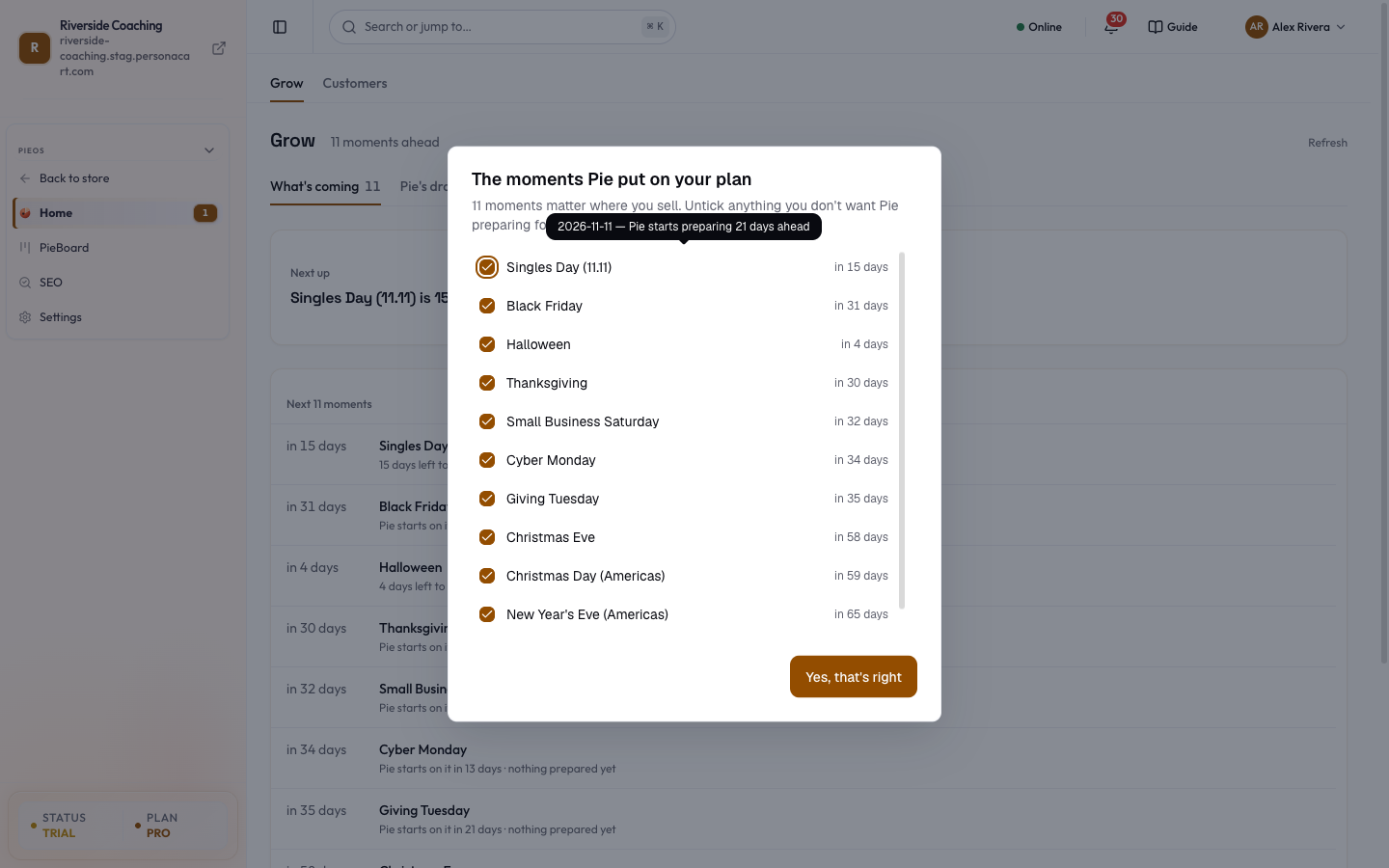
- The moments Pie put on your plan (first time): a dialog with every moment ticked. "[N] moments matter where you sell. Untick anything you don't want Pie preparing for." Hover a row to see its date and how many days ahead Pie starts. Press Yes, that's right. This dialog appears once. Afterwards, change your picks in the Event catalog.
- [N] moments are coming up (weekly): "Should Pie draft a plan for them?" with Yes, draft it or Not this week. "Pie prepares a draft for each one. Nothing is sent until you approve it." After Yes: "Pie is preparing them. You approve before anything goes out." After No: "Fine — Pie will ask again next week."
Win back quiet customers
- Open the Customers tab at the top of Grow.
- Open Gone quiet to see repeat buyers whose last order was more than 60 days ago, with their orders and days quiet. It lists up to 25, biggest spenders first.
- Press Draft a win-back message beside a name. Pie writes a draft. The button changes to Draft ready, but this screen does not link to the draft, and after a reload the button can be pressed again.
- Open Everyone for the totals. When nobody has gone quiet it says Nobody has gone quiet. Good sign.
Choose your own events
To browse every event Pie tracks and pick the ones you want, or to add your own date, see Event catalog.
The moments shown depend on your store's country and the events you picked. With no country set, the calendar stays empty.
What happens and what doesn't
- A moment on the list is a plan, not a promise. Anything Pie prepares waits for your approval.
- Pie starts preparing a set number of days before each date. The row shows how many days are left ("Pie starts on it in [N] days"), and the first-time dialog shows the lead time on hover. You can untick any moment.
- Which moments appear depends on your store's country and the events you picked.
- Grow only reads and proposes. Sending a campaign always needs your yes.
Questions
Where is the Year plan?
In Grow, under What's coming. The old Year plan address opens the PieBoard. Pick the events you want in the Event catalog.
Why is my calendar empty?
Pie needs your store country to know which festivals and tax dates apply. Set it in Settings, then Pie fills the calendar.
Will Pie send campaigns by itself?
No. It prepares drafts. They wait on the PieBoard for your approval.
Related
Part of PieOS: Business Operating System · Product page: PersonaCart with PieOS