Autonomy
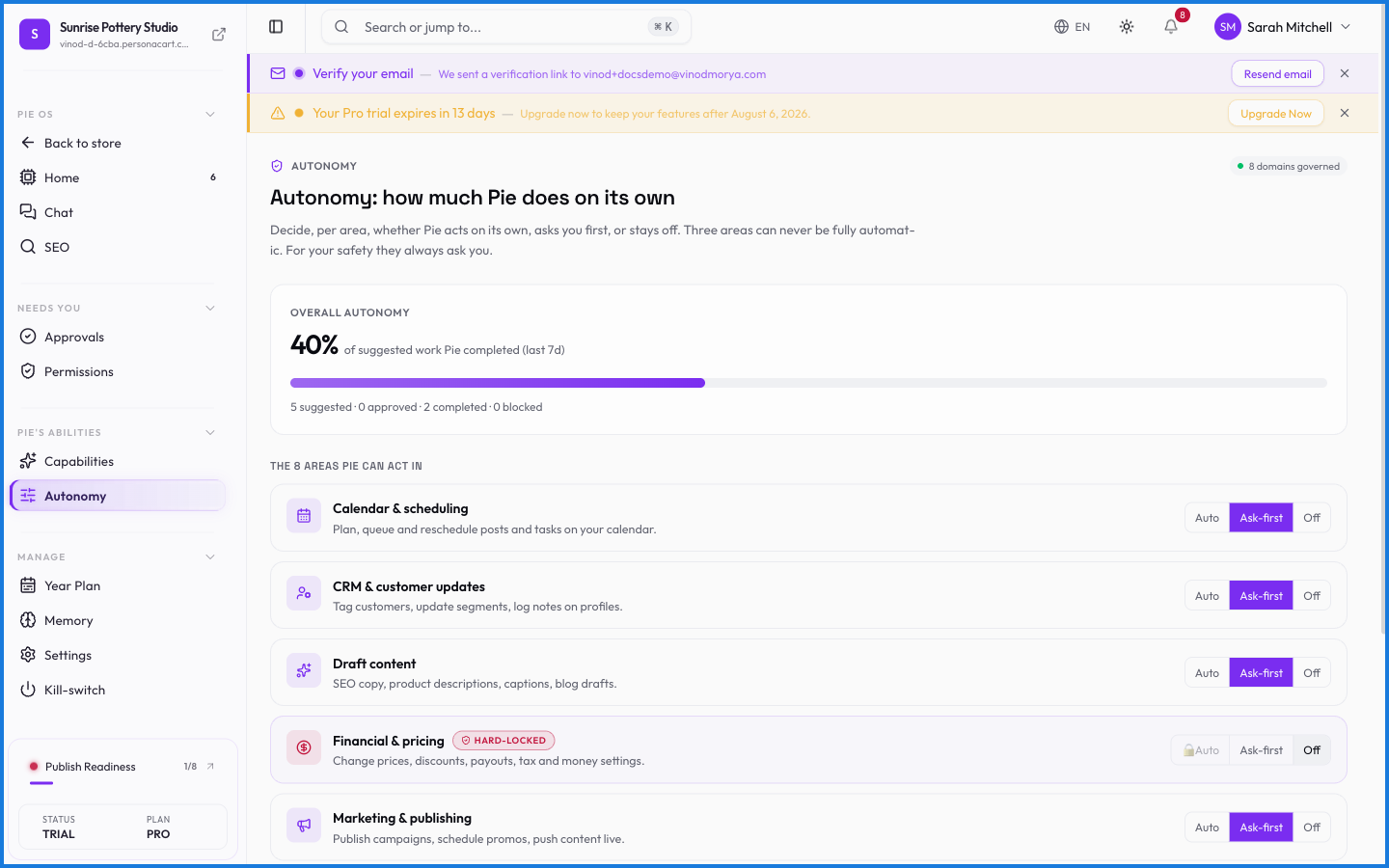
Autonomy is the dial for how independently PieOS works. At one end, it checks with you on everything. At the other, it handles routine, low-risk tasks on its own and saves the approvals for what matters. You decide how much to trust it, and you can change your mind anytime.
Where to find it
Sidebar → HOME → PieOS → Autonomy.
What happens — and what doesn't
- Higher autonomy means fewer stops for routine tasks — but consequential actions can still route through approvals.
- Lower autonomy means Pie proposes more and does less on its own — good while you're building trust.
- Autonomy works within permissions: it never lets PieOS act somewhere you haven't granted access.
- Whatever the setting, the kill-switch still stops everything instantly.
What does raising PieOS's autonomy do?
It lets PieOS handle more routine, low-risk tasks without stopping for approval, while consequential actions can still require your yes. It's how you give the AI more leash as you trust it.
Is higher autonomy risky?
You stay in control regardless — autonomy works only within the permissions you've granted, consequential actions can still need approval, and the kill-switch stops everything at any level.
What this screen looks like in every state
| State | When you'll see it | What you see, and what to do |
|---|---|---|
| Loading | The screen is fetching your data | A skeleton in the shape of the finished page. It should be brief — if it persists, the load has failed rather than stalled. |