Referrals
In short: Understand the two referral programs: Refer a friend for your own buyers, and PersonaCart Rewards where you earn free months. See where each lives.
PersonaCart has two different referral programs, and it helps to keep them apart: In this video you will learn how the referral program works. It is for store owners who want fans to bring friends and buy. By the end, you can read the page, find your share link, and know what the friend and you each get. These numbers count friends who came, their first orders, revenue and unspent credit. Show it on your store: add the Refer a friend section to any page. Or share this link to your refer page. Program on switches the whole program on or off. Friend gets sets what the friend receives, such as a percent off. Reward amount is what you give back. A set amount, or a share of the order. The preview shows what your fan sees. We stop here and save nothing. So: show the section or share the link, set both rewards, then watch results. Thank you so much for watching PersonaCart. To read the full guide, go to docs dot personacart dot com. To try PersonaCart yourself, go to personacart dot com. And subscribe, so you do not miss the next tutorial.Video transcript
| Refer a friend | PersonaCart Rewards | |
|---|---|---|
| Who shares | Your buyers | You |
| Who they tell | Their friends, to shop at your store | Other creators, to use PersonaCart |
| The reward | Store credit or a coupon for the buyer, and a discount for the friend | Free months on your PersonaCart plan |
| Where it lives | COMMERCE → Refer a friend | Earn free months in the top bar |
An older address, /settings/referrals, opens Refer a friend, because that is what people looking for "referrals" in Settings want.
Where to find it
Sidebar → COMMERCE → Refer a friend for your store's program. For PersonaCart Rewards, press Earn free months in the top bar or open Earn free months.
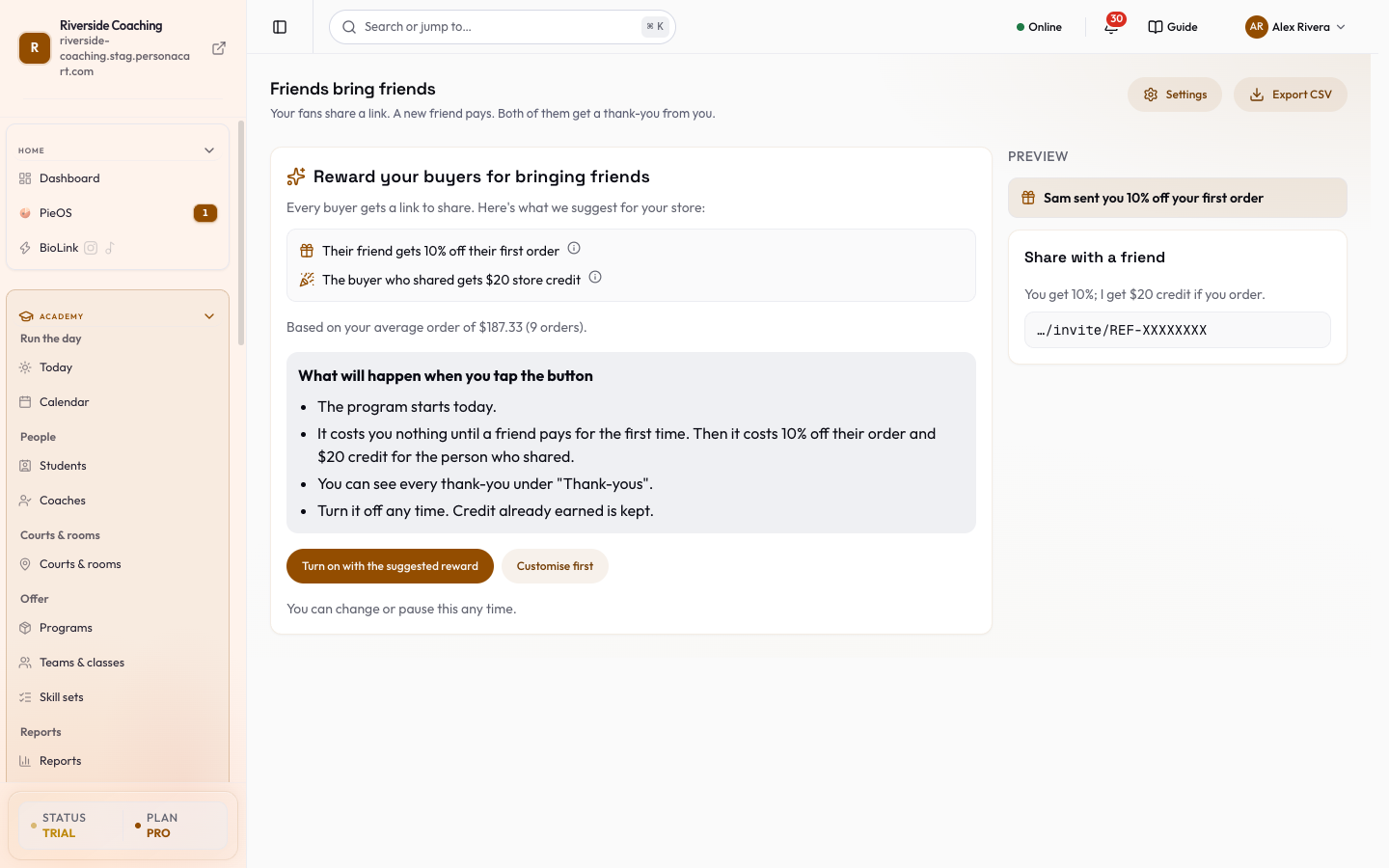
Set up Refer a friend
You decide the offer and the reward; PersonaCart runs it. The full guide to every setting, the Who shared list and the Thank-yous tab is in Refer a friend. It is on the Pro and Scale plans.
What your buyers see
- A share page on your store. The heading follows the pattern "Give [friend's offer], get [your reward]", for example a discount for the friend and store credit for the sharer.
- Get my link gives them their personal link, and How it works has three steps: get your link, share it (your friend gets the offer on their first order), and when they order you get the reward.
- Your friend's minimum order is shown if you set one.
- If you paused the program, the page says "Refer a friend isn't running right now" with Continue shopping.
- Their account. Under Refer & earn, Refer a friend shows Your referral code, Copy link, Share on WhatsApp, Show QR code ("Scan to join") with Download QR, an email share, and a stats line: "Your invites: N clicked · N signed up · N ordered".
- Their rewards. Four figures: Pending (rewards unlock after the hold period, with the date of the next one), Earned, Reversed (taken back because the friend's order was refunded after the reward was given) and Store credit.
- A note appears when rewards wait for your approval or when the program is paused.
- Who can share. A buyer who is not allowed yet sees "Place your first order to get a link to share", or "This store picks who can share. If you're picked, your link shows here." depending on your Who can refer setting.
What the friend sees
- A banner when they arrive on the link: "[Name] sent you [offer] off your first order", or free shipping. If the offer has ended, it says so.
- At checkout, Have a referral code? opens a Referral code box. When it works, the cart shows Referral applied or Referral from the sharer's name, and a Referral discount line.
- When a code cannot be used, a short reason is shown, for example: it is for first orders only, the order is below the minimum, no cart items qualify, it cannot be combined with a coupon (the one that saves the friend more is used), or it is the buyer's own code.
Turn it on
- Open Refer a friend and press Turn on with the suggested reward (a box shows the friend's offer and the sharer's reward first, and nothing is saved until you confirm), or Customise first.
- Check My reward (settings), especially Check rewards before they're given if you want to approve each reward.
- Press Try it with a test order to see the buyer's whole journey. Test rewards never give real credit or coupons.
- Open your thank-you page and the order confirmation email once to see where buyers find their link.
Earn free months with PersonaCart Rewards
- This program is about your own PersonaCart plan.
- It is shown as a gold Earn free months button in the top bar, in your account menu and on the billing page.
- A note on the page says "A PersonaCart program, not your store's referral program", with a link, Store's own refer-a-friend?, to the other one.
On the page, from top to bottom:
At the very top, three steps show the idea: Copy your link, Send it to one friend, They pay, you get a month.
- Your months: Given this year (free months already added to your plan in the last 12 months), Waiting (still in their 14 day wait, or reviews being checked) and Banked. Banked months are saved while you are on a trial or the free plan and start when you start paying.
- Invite creators: a share card with your personal link and these buttons.
- Copy my link copies your personal link.
- Message you can paste opens a short note with your link already inside; press Copy message, then Close.
- How free months work opens a plain-words sheet with the steps and the 12 month yearly limit.
- The card also has Show QR code, a text message, WhatsApp and an email share.
- When a creator you invite pays, you get 1 free month after 14 days, and 1 more after their second payment.
- The creator you invite pays the normal price; only you get the month.
- If their first payment is refunded within the 14 days, the free month is cancelled.
- There is a yearly limit on months from invites and reviews together, and the page shows how many you have earned.
- Your invites: everyone who signed up with your link, even before they pay, with the states Signed up (trial, not paid yet), Paid, Paid, reward pending until a date, Paid, reward cancelled and Reward earned.
- Emails are partly hidden to protect their privacy.
- Reward rows show 1st month and 2nd month with statuses such as Waiting 14 days, Month added, Banked and Cancelled with the reason (yearly limit reached, payment refunded, no payment went through, or a check in progress).
- Review PersonaCart, get 1 free month: a card for each review site.
- Today only YouTube is open (Write a review); G2, Capterra and TrustRadius show Coming soon until PersonaCart is listed there.
- Any honest review counts, good or bad; the page never asks for a rating.
- Add the line "PersonaCart gave me 1 free month for writing this review." to your review (Copy the line), paste the public link in Link to your review, and press Submit.
- PersonaCart opens the link, checks it is yours and then adds your month.
- Trustpilot is not included because its rules do not allow rewards for reviews.
- Only the store owner or an admin can submit review links.
If PersonaCart pauses the program, the page says "This program is paused": no new free months are given, and months you already have stay on your plan.
Test orders in Refer a friend never create real credit. Rewards are given after a waiting period so a refund can still cancel them. For PersonaCart Rewards, free months are banked, not lost, while you are on a trial or the free plan.
Questions
Are Refer a friend and PersonaCart Rewards the same?
No. Refer a friend rewards your own buyers for bringing their friends to your store. PersonaCart Rewards gives you free months of your plan for bringing other creators to PersonaCart or reviewing it.
Does the friend need a code?
No. The friend opens the link and the discount is applied to their first order. A code box at checkout is there for people who have a code but not the link.
Where do buyers find their link?
On the thank-you page after they pay, in their order confirmation email, and in their account under Refer & earn.
Why can't I see Earn free months?
The button is hidden if PersonaCart has paused the program, or if your plan is a BioLink plan, which has no store plan to extend.
Related
Part of Marketing and Analytics Guides · Product page: PersonaCart features