Visitors
In short: See who comes to your store: sessions, visitors, bounce and cart abandon, devices, countries, where they came from, top pages and how many customers come back.
The Visitors tab of Analytics answers "who comes to my store and where do they come from?". It has six headline numbers, four breakdowns, a list of your most viewed pages, a customer retention table and, at the bottom, the activity history.
Where to find it
Sidebar → GROWTH → Analytics → Visitors. The older addresses /growth/analytics/visitors and /growth/analytics/activity open this tab.
- The tab follows the period and comparison chosen in the bar at the top of Analytics (the date button shows the days, for example 30 Days) (see Analytics).
- The headline numbers use the days you picked (this tab uses the smallest of 7 days, 30 days, 90 days or all time that covers your range), the top pages list always covers the last 30 days, and the retention table covers the last 3 months.
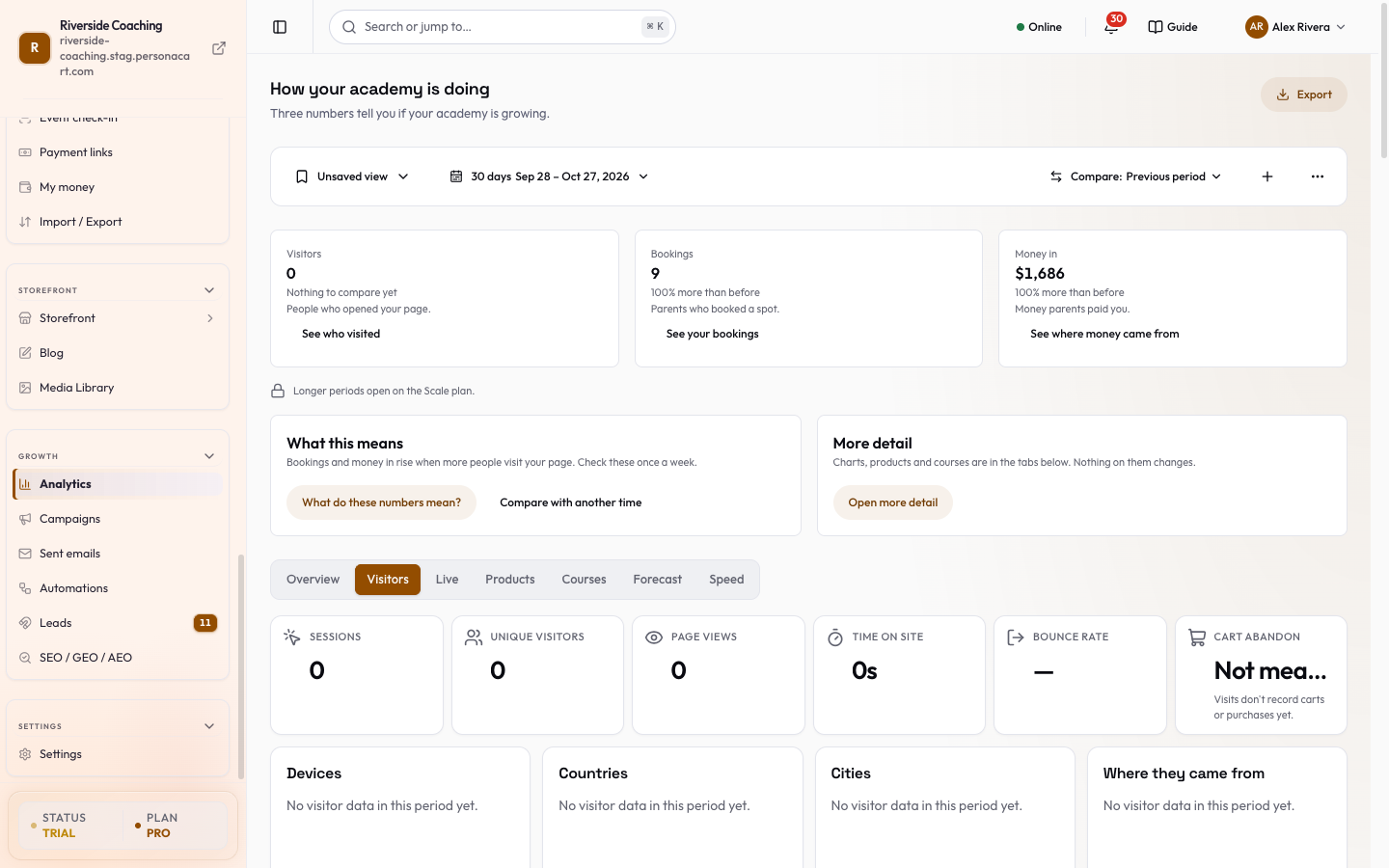
Read the six headline numbers
| Number | What it means |
|---|---|
| Sessions | Visits to your store. One person coming back later counts again. |
| Unique visitors | Different people, counted once each. |
| Page views | Pages opened across all visits. |
| Time on site | The typical (median) length of a visit, shown as minutes and seconds. |
| Bounce rate | The share of visits that looked at one page and left. A dash means it could not be worked out for the period. |
| Cart abandon | The share of visits that added to cart and did not buy. Underneath: the count of carts and purchases, for example "14 carts · 5 bought". If visits are not recording carts or purchases, it says Not measured yet and "Visits don't record carts or purchases yet." |
See where visitors come from
Each is a short ranked list with a bar. When there is nothing for the period it says No visitor data in this period yet.
- Devices: the kinds of device visitors use.
- Countries
- Cities
- Where they came from: the websites, search engines and social apps that sent visitors.
Find your most viewed pages
The ten pages of your store with the most views in the last 30 days. Each row shows the page title, its address on your store and the number of views. Use it to see which page earns attention; with nothing recorded yet it says "No page views recorded in the last 30 days."
Check who comes back
A table of how many of your customers come back and buy again, grouped by the month they first bought.
-
Cohort is the month of a customer's first paid order.
-
Customers is how many first bought that month.
-
M0, M1, M2 are that month, the next month and the one after. A cell shows the percentage of the cohort that bought in that month.
-
A cell marked with an asterisk (
*) is a month still running, so it is left out of the average. -
A grey row with Too few (under 5), % not shown has fewer than 5 customers, which is too few to judge.
-
A dash means that month has not been reached.
-
Above the table, a sentence gives the average: "On average, N% of customers buy again in their second month." Two tiles show Avg Month-1 retention and the number of Cohorts (with how many have under 5 customers).
-
Until a cohort has finished its second month the tile says Shows once a full cohort reaches month 1.
-
With no repeat customers yet the card says "Retention appears once you have repeat customers", and "The first cohort appears with the first paid order."
Press a percentage in a cell to open the customers behind it: a panel titled "Customers in" the cohort and month, with each customer's Name and Number (or "No name"). If the list is long it shows the first customers and says how many in total.
Open the activity list
At the bottom of the tab sits the full list of visitor events. It is described on its own page: Activity history. It is on the Pro and Scale plans.
Visitors you see here are anonymous until they give an email or buy. Nothing on this tab shows a visitor's name. When someone buys, their activity moves to their customer record. See Visitor profile.
Questions
What is the difference between a session and a visitor?
A visitor is a person. A session is one visit. A person who comes on Monday and again on Friday is one visitor and two sessions.
Why does Cart abandon say Not measured yet?
Visits for the period did not record any cart or purchase events, so a percentage would be misleading. It fills in as shoppers use your cart.
Why is a retention row grey?
It has fewer than 5 customers. Percentages of a handful of people jump around, so the row only shows the count.
Why do the headline numbers differ from the top pages list?
The headline numbers follow the days you picked at the top of Analytics. The top pages list always covers the last 30 days.
Related
Part of Marketing and Analytics Guides · Product page: PersonaCart features