Revenue forecast
In short: See what income to expect next month and next year, built from renewals already due plus your one-off sales pace. Set a monthly revenue goal.
The Forecast tab of Analytics tells you what to expect next month and how that is built, and lets you set a revenue goal for the month and watch your progress. It is an estimate from your own sales, not a promise. In this video you will learn how to read your Revenue forecast. You will see your sales history, what renews, and how your monthly goal is going. Nothing is changed. Sales history is how many days of sales the forecast has: twelve. Renewals due is money from subscriptions that renew soon. One-off pace is how fast single sales are coming in. With under thirty days of sales it is too early to forecast. The page says so. Goal for this month shows your target, what you earned and the daily pace needed. Change goal sets a new target. We leave it alone. Projected Annual needs three months of history before it shows a figure. So: check the days of sales, the renewals, and your goal pace. Thank you so much for watching PersonaCart. To read the full guide, go to docs dot personacart dot com. To try PersonaCart yourself, go to personacart dot com. And subscribe, so you do not miss the next tutorial.Video transcript
Where to find it
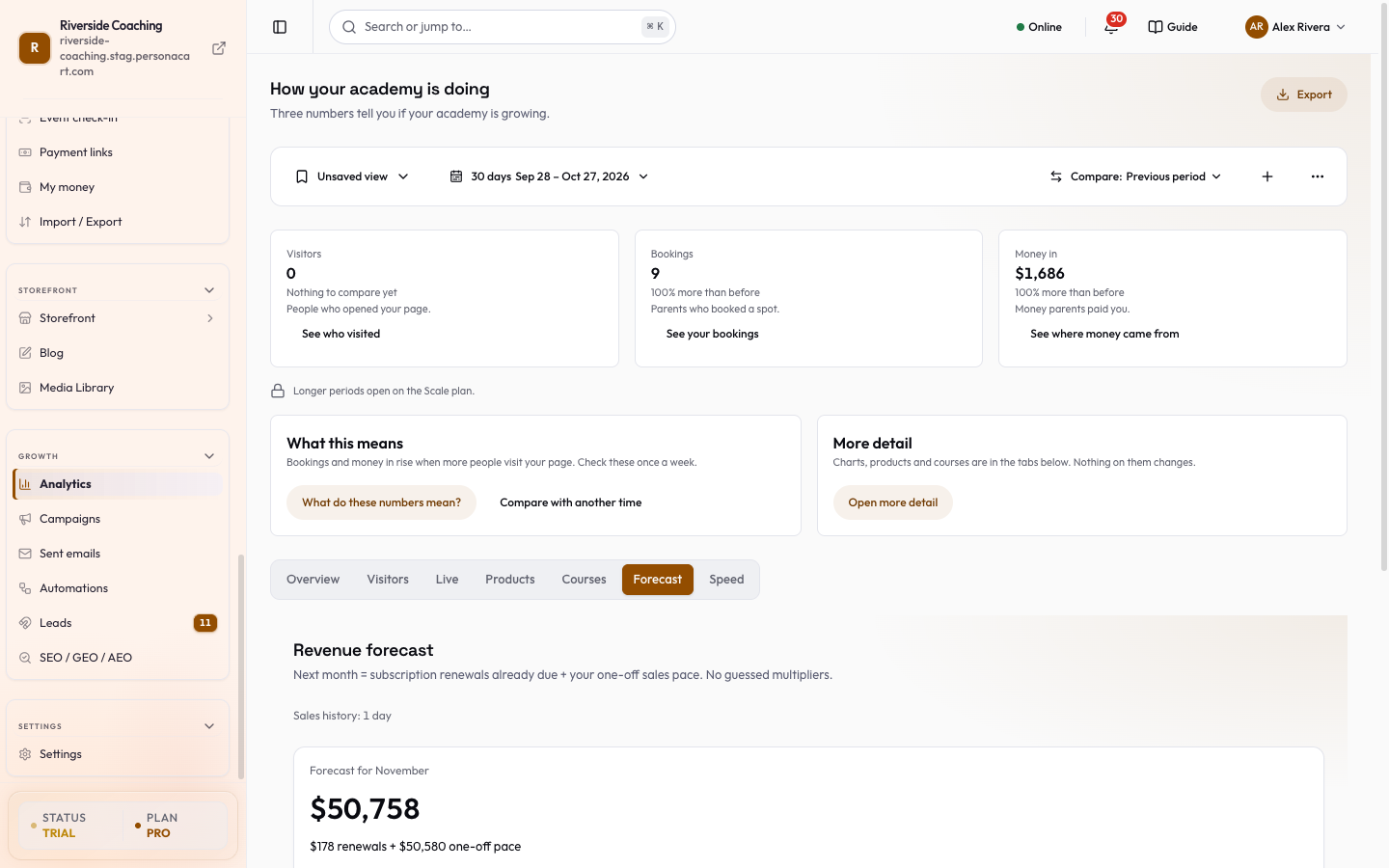
Sidebar → GROWTH → Analytics → Forecast. The address /growth/analytics/forecast opens the same page. The forecast is in your store's currency and is on Starter and higher plans.
The Forecast does not use the period bar at the top of Analytics; it always looks at your sales history.
Understand how it is worked out
The page header states the method in one line: Next month = subscription renewals already due + your one-off sales pace. The page header adds No guessed multipliers, so nothing is multiplied by a growth factor.
- Renewals due are active subscriptions that renew next month, at the price they pay.
- One-off pace is your average sales per day that are not renewals, over the last 90 days (this month included), multiplied by the number of days in next month.
Read the forecast
Sales history
A line at the top (Sales history) says how much history the forecast has, in months, or in days when you have less than a month (for example "12 days"). With under 30 days of sales the page says Too early to forecast.
Forecast for next month
A large card named Forecast for and the month. It shows the amount, then how it splits, for example "800 renewals + 450 one-off pace" in your currency, with a two-colour bar of that split.
Projected Next Month
Three lines:
- Renewals due
- One-off pace
- Likely range: a low and a high figure ("Likely 900 – 1,500" in your currency). The range appears after 30 days of sales; until then the line says Range appears after 30 days of sales.
Projected Annual
The next 12 months of subscription renewals plus your one-off pace. It is shown once you have 3 months of sales. Before that, a warning says Not enough history yet (needs 3 months) and counts the days you have: "N days of sales so far. The 12-month figure needs 90."
Set Revenue Goal
A card titled Set Revenue Goal sets a target for this month.
- Type an amount in Amount (e.g. 5000).
- Press Confirm Goal. A message says Revenue goal set to the amount.
- The card now shows progress: "X of Y", a gauge, and either "N days left · amount/day needed" or Goal reached.
Once a goal is set the card is titled Goal for this month and has a Change goal button to set a new target. With no goal the card says "No goal yet. Write one to see this month's progress." Nothing is filled in for you. The goal is monthly, in your store's currency.
Confirming a new amount replaces the goal you had, and the card updates at once to the new "X of Y".
A small badge and the note "3, 6 and 9 months open once you have that much history" tell you that longer look-backs unlock as your history grows.
If there is not enough data
With no orders the page says Not enough data and "Your forecast appears as soon as you have your first order. The more months of sales history you build up, the higher its confidence."
The forecast shows what your own past sales and renewals point to. A launch, a sale or a cancelled plan will change it. Use the range, not the single number, when you plan spending.
Questions
How accurate is the forecast?
Renewals are known amounts. The one-off part is an average of your recent pace, so it is an estimate. The likely range shows how far it could reasonably move once you have 30 days of sales.
Does setting a goal change the forecast?
No. The goal only draws your progress. It does not alter any number.
Why is the annual figure missing?
It needs 90 days of sales. The card shows how many days you have so far.
Related
Part of Marketing and Analytics Guides · Product page: PersonaCart features