Use the in-app Guide with these docs
In short: How the in-app Guide and these docs link to each other: one click from a screen to its docs page, and one click back into the app.
PersonaCart has two kinds of help that point at each other:
- The Guide lives inside the app. It explains the screen you are on in a minute, with a tour that points at the real buttons.
- These docs explain every screen in full: every field, every choice, what happens after you save, and common questions.
Start with whichever is closer. Each one takes you to the other.
Where to find it
The Guide button is in the top bar of every creator screen. Docs pages open the app with Open in dashboard, or with an app link in the text.
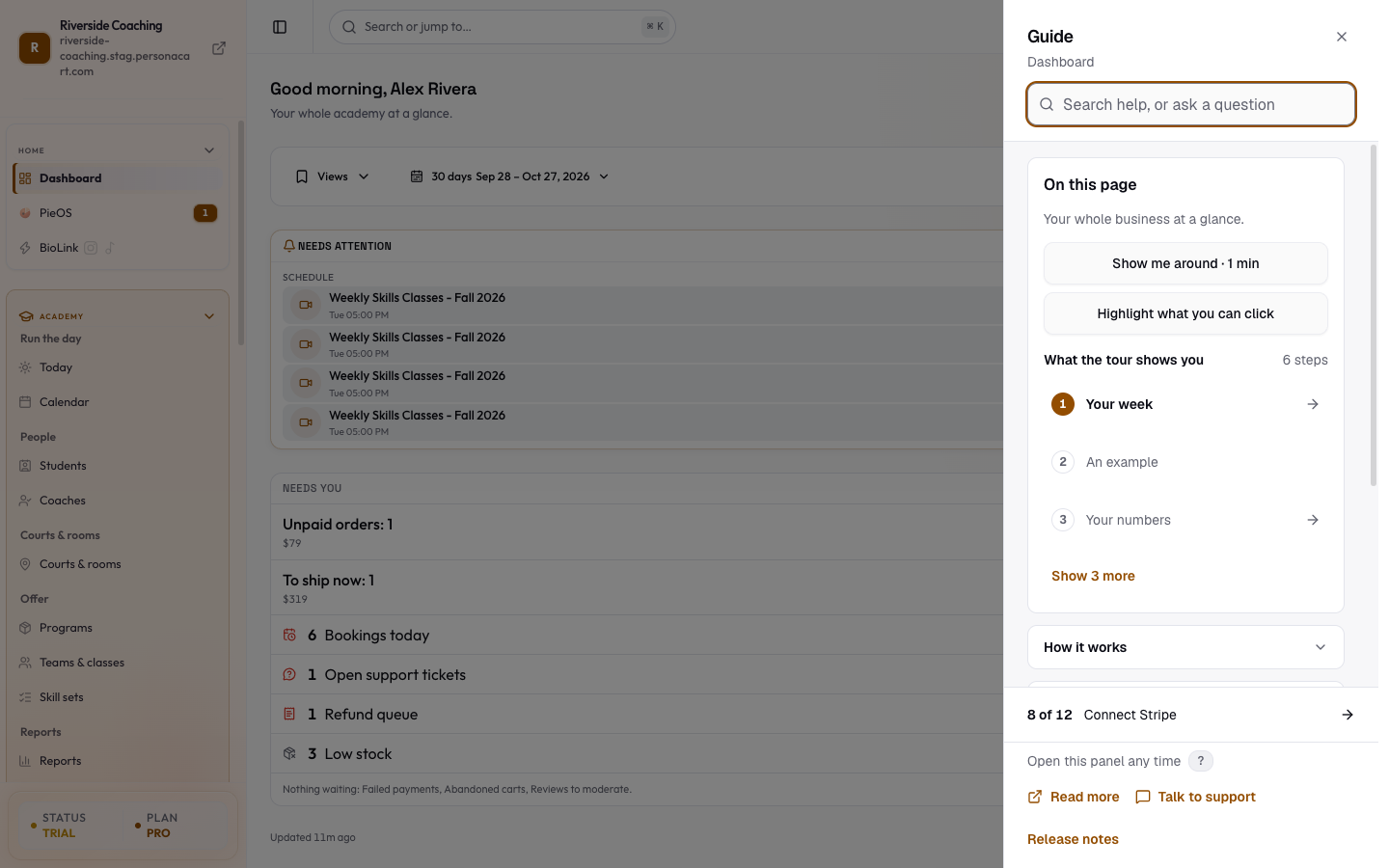
Go from the app to the docs
- On any screen, press Guide in the top bar (a book icon and the word Guide), or press ? anywhere outside a text box. On a phone the button is a square book icon.
- The Guide side sheet opens for that screen.
- Open How it works. At the bottom it says Read the full guide in the docs. Press it and this site opens in a new tab, on the page for the screen you were on.
- Some screens are explained on more than one docs page (for example Products has a page for each product type). Those pages are listed under Related in the docs.
The tour links here too. Press Show me around · 1 min; the last stop of the tour has Open the docs page next to Finish.
The footer of the Guide also has Read more, which opens the same docs page.
The small information icons next to some page titles open the same Guide sheet, so they lead to the same docs page.
Go from the docs to the app
Pages that describe a screen start with a short box, In your dashboard:
- Open in dashboard opens that screen in PersonaCart in a new tab. If you are not signed in, you sign in first and land on the screen.
- The box also says: "In the app, open the Guide on this screen for a short tour."
Links in the text such as Dashboard also open the app.
Which one to use
| You want to | Use |
|---|---|
| Know what a screen is for, quickly | The Guide: the line under On this page |
| See where each button is | The Guide: Show me around or Highlight what you can click |
| Understand every field and setting | These docs |
| Read about a screen before you open it | These docs |
| Ask a question in your own words | The Guide: Ask Pie or Ask a person |
Good to know
- The Guide always links to the docs page for the screen you are on. If a screen has no docs page yet, the link is hidden rather than sending you somewhere else.
- The docs are in English. The Guide follows the dashboard language you chose.
- Opening the docs never changes anything in your store.
Questions
Where is the docs link in the Guide?
Open the Guide, open How it works, and press Read the full guide in the docs at the bottom. The Guide footer also has Read more.
Does the tour link to the docs?
Yes. The last stop of the tour has Open the docs page next to Finish.
How do I get from a docs page back to the screen?
Press Open in dashboard in the box at the top of the page. Then press Guide in the top bar for a short tour.
Related
Part of Getting Started with PersonaCart · Product page: How PersonaCart works