Products
The Products page is your catalog. Everything you sell — a $24 mug, a $129 video course, a Saturday workshop — lives here as a product, whatever its type. You create, filter, publish, and retire products from this one screen.
Every product field lists all 105 inputs the editor can show — what each one does, what it accepts, and which product types see it.
Where to find it
Sidebar → COMMERCE → Products. The page has tabs along the top: the product list, Inventory, and Collections.
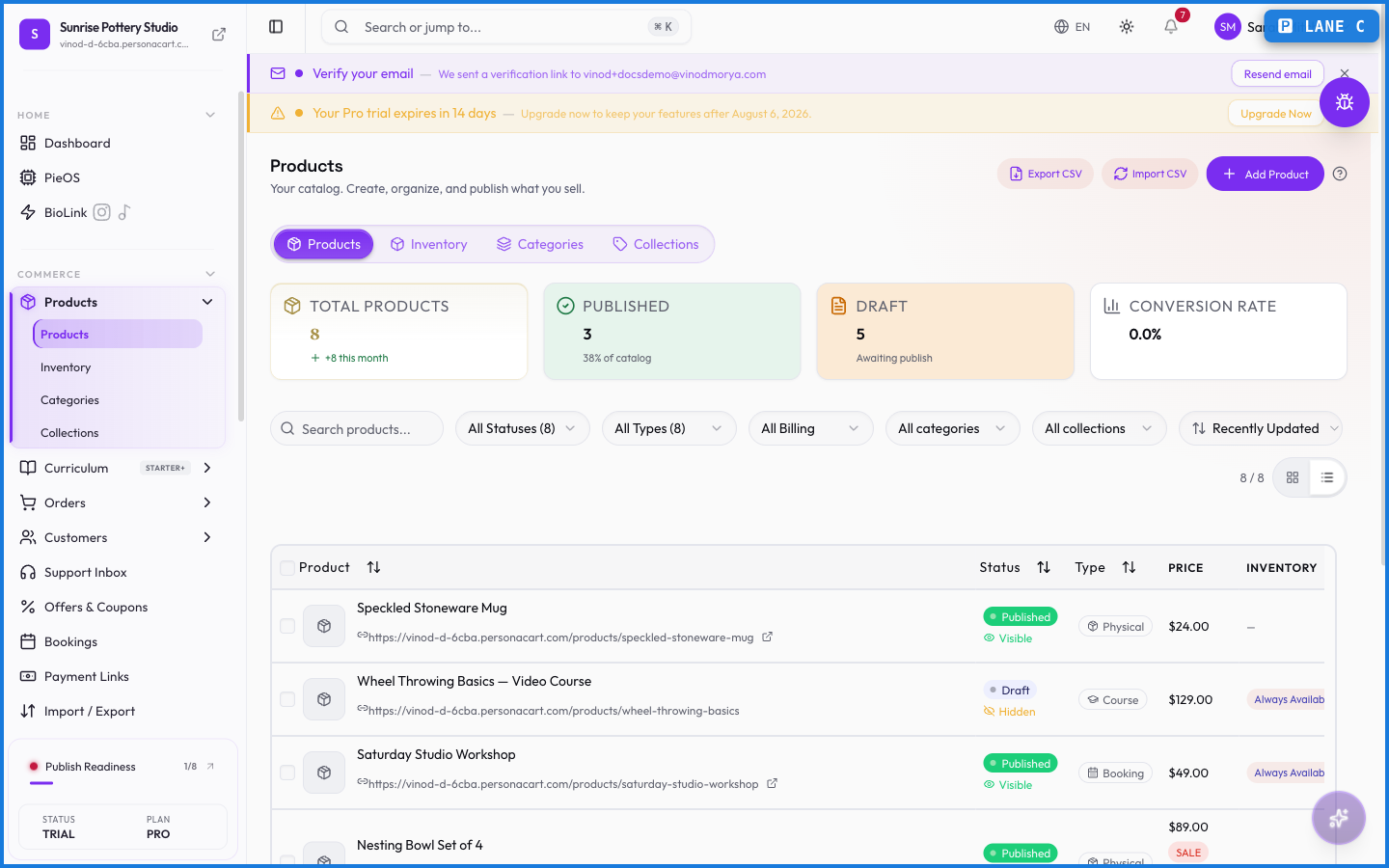
The product list
Each row shows the product's name and slug, a status badge (Draft, Published, or Archived), its type, price, stock, tags, and created/updated dates. A few details worth knowing:
- Clicking the name opens the product editor. Clicking the slug copies the public URL.
- Price shows a strikethrough compare-at price underneath when you've set one, and a billing period for recurring products ("$9.99/mo").
- Stock reads "N/A" for types that don't track inventory (digital, course), turns amber under 50 units, and red at zero.
- A product can be published but Hidden from the storefront — the row says so under the status badge.
Filters cover status, type, and billing (one-time vs recurring), plus eight sort orders including price and stock. Active filters show as removable badges with a "Clear all" shortcut. The counter on the right always tells you how many products match ("4 of 4 products").
The row menu
The three-dot menu on each row: Preview (opens the storefront page), Edit, Copy URL, Duplicate, then Publish/Unpublish (whichever applies), Archive, and Delete. Delete asks for confirmation and is permanent; Archive is the reversible option.
Editing a product
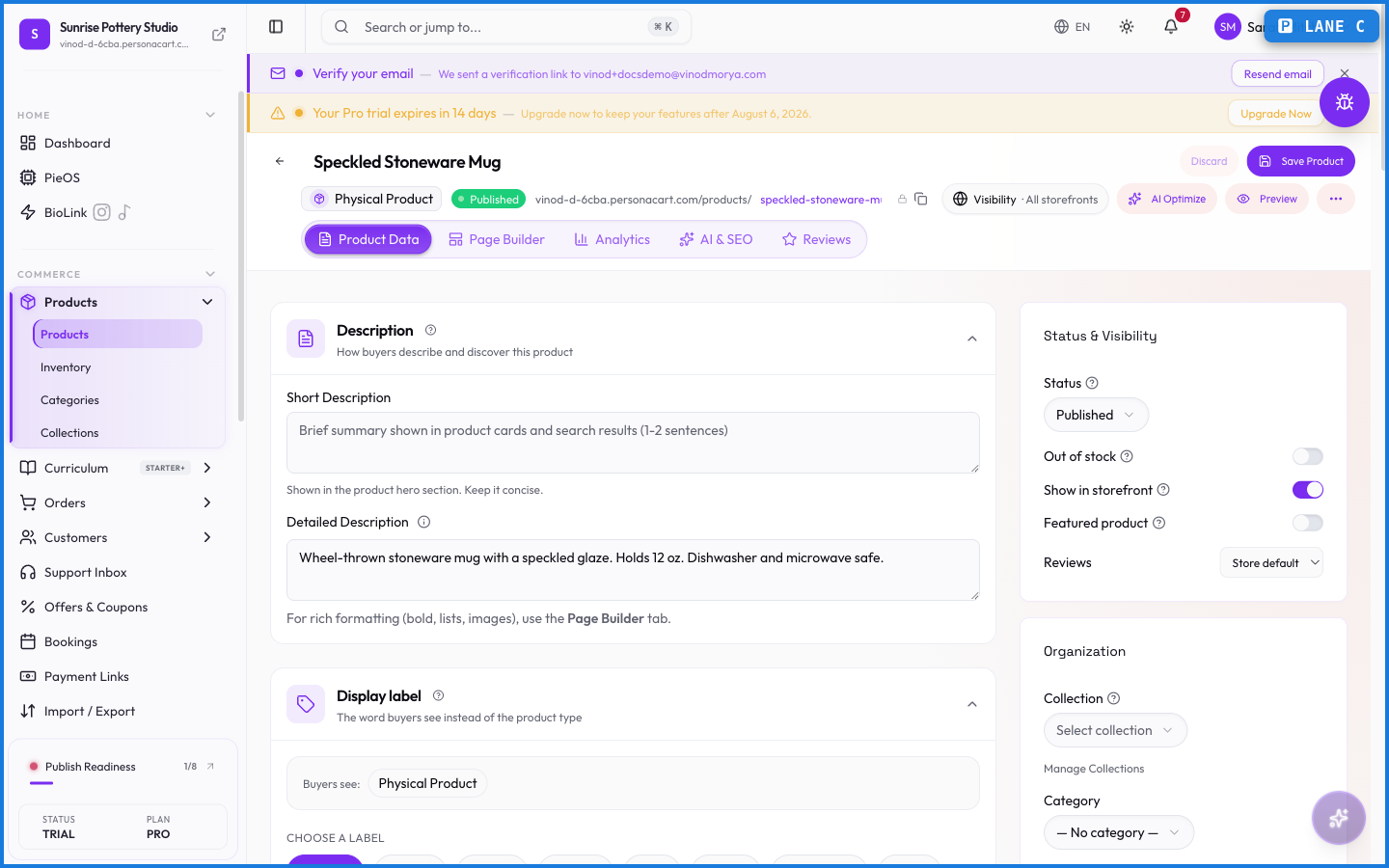
The editor covers the product's content, pricing (price, compare-at, currency follows your store), images, variants with per-variant stock and media, SEO fields, and type-specific extras (shipping details for physical goods, files for digital ones, curriculum for courses). Changes apply when you hit Save — there's no autosave here, which means you can experiment freely before committing.
What happens — and what doesn't
- Draft products are invisible to buyers. Publish flips them live on your storefront immediately.
- A course product won't publish without a curriculum linked. You can save it as a draft, build the curriculum, connect it, and then publish.
- Duplicating copies the product's content as a new draft — sales history stays with the original.
- Deleting is permanent and removes the product from your catalog. Orders that already sold it keep their records.
- Prices are in your store currency (set at signup). Multi-currency display depends on your payment gateway.
What product types does PersonaCart support?
Physical, digital, event, course, bundle, membership, subscription box, service, booking, and tip. See the Product types page for what each one does.
Why won't my course product publish?
A course needs a curriculum linked before it can go live. Save it as a draft, build the curriculum under Commerce → Curriculum, link it in the product editor, then publish.
What's the difference between Archive and Delete?
Archive hides the product but keeps it recoverable — you can restore it any time. Delete is permanent and asks for confirmation first.
Can a product be published but not visible?
Yes. Visibility on the storefront is separate from publish status, and the list marks those rows as Hidden. Check the product's visibility setting in the editor.
What this screen looks like in every state
| State | When you'll see it | What you see, and what to do |
|---|---|---|
| Loading | The screen is fetching your data | A skeleton in the shape of the finished page. It should be brief — if it persists, the load has failed rather than stalled. |
| Error | The data couldn't be loaded | A message with a retry. Retry first: most of these are a dropped request, not a broken store. If it repeats, the outage is upstream and reloading won't help. |
| No access | Your role doesn't include this screen | A permission notice instead of the page. An owner or admin can grant access under Settings → Team. |
When something goes wrong
These are the messages this screen can show you, and what each one means.
| If you see | What to do |
|---|---|
| All selected products are already hidden from storefront | Retry the action. If it keeps happening, contact support with what you were doing. |
| All selected products are already visible on storefront | Retry the action. If it keeps happening, contact support with what you were doing. |
| Couldn't load the rest of your inventory. | Retry the action. If it keeps happening, contact support with what you were doing. |
| Couldn't save the new order | The change didn't save. Retry — if it keeps failing, the request isn't reaching the server. |
| Couldn’t save the new order | The change didn't save. Retry — if it keeps failing, the request isn't reaching the server. |
| Enter a valid non-negative number | Do what the message asks, then try again — it names exactly what's missing. |
| Enter a valid non-zero quantity | Do what the message asks, then try again — it names exactly what's missing. |
| Enter a valid quantity | Do what the message asks, then try again — it names exactly what's missing. |
| Failed to archive … product{count, plural, one {} other …} | The change didn't save. Retry — if it keeps failing, the request isn't reaching the server. |
| Failed to create collection | The change didn't save. Retry — if it keeps failing, the request isn't reaching the server. |
| Failed to create product | The change didn't save. Retry — if it keeps failing, the request isn't reaching the server. |
| Failed to delete product | The change didn't save. Retry — if it keeps failing, the request isn't reaching the server. |
| Failed to delete … product{count, plural, one {} other …} | The change didn't save. Retry — if it keeps failing, the request isn't reaching the server. |
| Failed to duplicate product | That value is already used. Pick a different one. |
| Failed to publish … product{count, plural, one {} other …} | The change didn't save. Retry — if it keeps failing, the request isn't reaching the server. |
| Failed to update status | The change didn't save. Retry — if it keeps failing, the request isn't reaching the server. |
| Failed to update stock | The change didn't save. Retry — if it keeps failing, the request isn't reaching the server. |
| Failed to update … product{count, plural, one {} other …} | The change didn't save. Retry — if it keeps failing, the request isn't reaching the server. |
| Invalid value | The value isn't in the expected format. Check it against the field's rules above. |
| No draft products selected to publish | Retry the action. If it keeps happening, contact support with what you were doing. |
| No items selected | Retry the action. If it keeps happening, contact support with what you were doing. |
| No products imported | Retry the action. If it keeps happening, contact support with what you were doing. |
| No products to archive | Retry the action. If it keeps happening, contact support with what you were doing. |
| No valid rows found. CSV needs columns: sku/product_name and quantity. | The value isn't in the expected format. Check it against the field's rules above. |