Inventory
The Inventory Center tracks how many units you have of everything that needs counting. Physical products and their variants show up here; digital products and courses don't, because there's nothing to run out of.
Where to find it
Sidebar → COMMERCE → Products, then the Inventory tab.
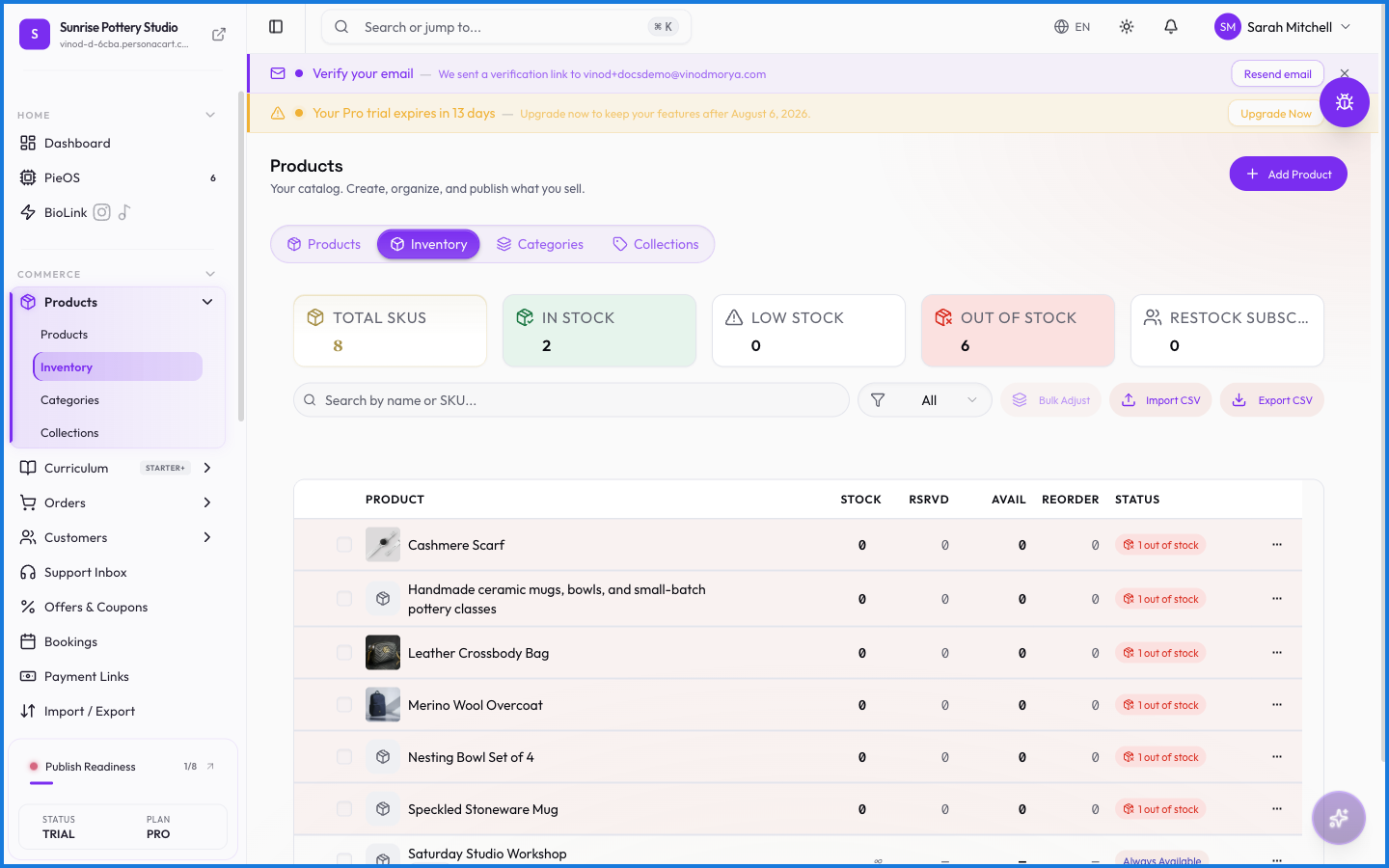
The four cards up top
- Total SKUs — how many distinct items (product variants count separately) you're tracking.
- Low Stock Alerts — items at or below their reorder threshold.
- Out of Stock — items at zero.
- Last Sync — when inventory numbers last changed.
The four tabs
- Stock Levels — the main table. Product, SKU, variant, current stock, available (current minus reserved), reserved for pending orders, reorder threshold, and a status badge: green In Stock, amber Low Stock, red Out of Stock.
- Alerts — just the items that need attention, with a count badge.
- History — a log of every stock change: what moved, by how much, and when.
- Demand — products where buyers are waiting on a restock, so you know what to make next.
Editing stock
Click any number in the Current Stock column and type the new count — it saves in place, no separate form. The Reorder At column opens threshold settings, which decide when an item flips to Low Stock and shows up in Alerts.
You can select multiple rows with the checkboxes for bulk changes, and Export CSV (top right) downloads the whole list.
What happens — and what doesn't
- Reserved stock is held for orders that are placed but not finished. Available = current − reserved, so you can't oversell while a checkout is in flight.
- Statuses are computed, not set by hand: stock above the threshold is In Stock, at or below it is Low Stock, zero is Out of Stock.
- When an item hits zero, buyers see it as out of stock on the storefront. Whether they can join a waitlist drives the Demand tab.
- Digital, course, and service products never appear here — their stock is effectively infinite.
How do I change a product's stock count?
Open the Inventory tab, click the number in the Current Stock column, and type the new value. It saves immediately.
What does Reserved mean?
Units held for orders that are in progress but not yet complete. Available stock is current stock minus reserved, and that's what buyers can actually purchase.
When does a product show as Low Stock?
When its current stock is at or below its reorder threshold. You control the threshold per item via the Reorder At column.
Do digital products appear in inventory?
No. Only product types with physical units — physical products and their variants — are tracked. Digital, course, and service types show N/A for stock.
Every field on this screen
Every control on this tab, read straight from the live app.
| Field | Type | What it accepts | What it does |
|---|---|---|---|
| Adjust by | Number | — | |
| All | Dropdown | — | |
| Mode | Number | — | |
| Quantity Change | Number | — | e.g. e.g. +20 or -3 |
| Reason | Number | — | e.g. e.g. Restocked from supplier |
| Search by name or SKU | Text | — | |
| Set to | Number | — |
7 fields, read from the live app. Which ones you see depends on the product type and your plan.
What this screen looks like in every state
| State | When you'll see it | What you see, and what to do |
|---|---|---|
| Loading | The screen is fetching your data | A skeleton in the shape of the finished page. It should be brief — if it persists, the load has failed rather than stalled. |
| Error | The data couldn't be loaded | A message with a retry. Retry first: most of these are a dropped request, not a broken store. If it repeats, the outage is upstream and reloading won't help. |
| No access | Your role doesn't include this screen | A permission notice instead of the page. An owner or admin can grant access under Settings → Team. |
When something goes wrong
These are the messages this screen can show you, and what each one means.
| If you see | What to do |
|---|---|
| All selected products are already hidden from storefront | Retry the action. If it keeps happening, contact support with what you were doing. |
| All selected products are already visible on storefront | Retry the action. If it keeps happening, contact support with what you were doing. |
| Couldn't load the rest of your inventory. | Retry the action. If it keeps happening, contact support with what you were doing. |
| Couldn't save the new order | The change didn't save. Retry — if it keeps failing, the request isn't reaching the server. |
| Couldn’t save the new order | The change didn't save. Retry — if it keeps failing, the request isn't reaching the server. |
| Enter a valid non-negative number | Do what the message asks, then try again — it names exactly what's missing. |
| Enter a valid non-zero quantity | Do what the message asks, then try again — it names exactly what's missing. |
| Enter a valid quantity | Do what the message asks, then try again — it names exactly what's missing. |
| Failed to archive … product{count, plural, one {} other …} | The change didn't save. Retry — if it keeps failing, the request isn't reaching the server. |
| Failed to create collection | The change didn't save. Retry — if it keeps failing, the request isn't reaching the server. |
| Failed to create product | The change didn't save. Retry — if it keeps failing, the request isn't reaching the server. |
| Failed to delete product | The change didn't save. Retry — if it keeps failing, the request isn't reaching the server. |
| Failed to delete … product{count, plural, one {} other …} | The change didn't save. Retry — if it keeps failing, the request isn't reaching the server. |
| Failed to duplicate product | That value is already used. Pick a different one. |
| Failed to publish … product{count, plural, one {} other …} | The change didn't save. Retry — if it keeps failing, the request isn't reaching the server. |
| Failed to update status | The change didn't save. Retry — if it keeps failing, the request isn't reaching the server. |
| Failed to update stock | The change didn't save. Retry — if it keeps failing, the request isn't reaching the server. |
| Failed to update … product{count, plural, one {} other …} | The change didn't save. Retry — if it keeps failing, the request isn't reaching the server. |
| Invalid value | The value isn't in the expected format. Check it against the field's rules above. |
| No draft products selected to publish | Retry the action. If it keeps happening, contact support with what you were doing. |
| No items selected | Retry the action. If it keeps happening, contact support with what you were doing. |
| No products imported | Retry the action. If it keeps happening, contact support with what you were doing. |
| No products to archive | Retry the action. If it keeps happening, contact support with what you were doing. |
| No valid rows found. CSV needs columns: sku/product_name and quantity. | The value isn't in the expected format. Check it against the field's rules above. |