Curriculum
A curriculum is the teaching side of PersonaCart: the lessons, in order, that make up a course. You build the curriculum here, then link it to a course product so buyers who purchase get access and progress tracking.
Pro Curriculum tools are on a paid plan. On a plan that doesn't include them, the page shows what you'd unlock by upgrading.
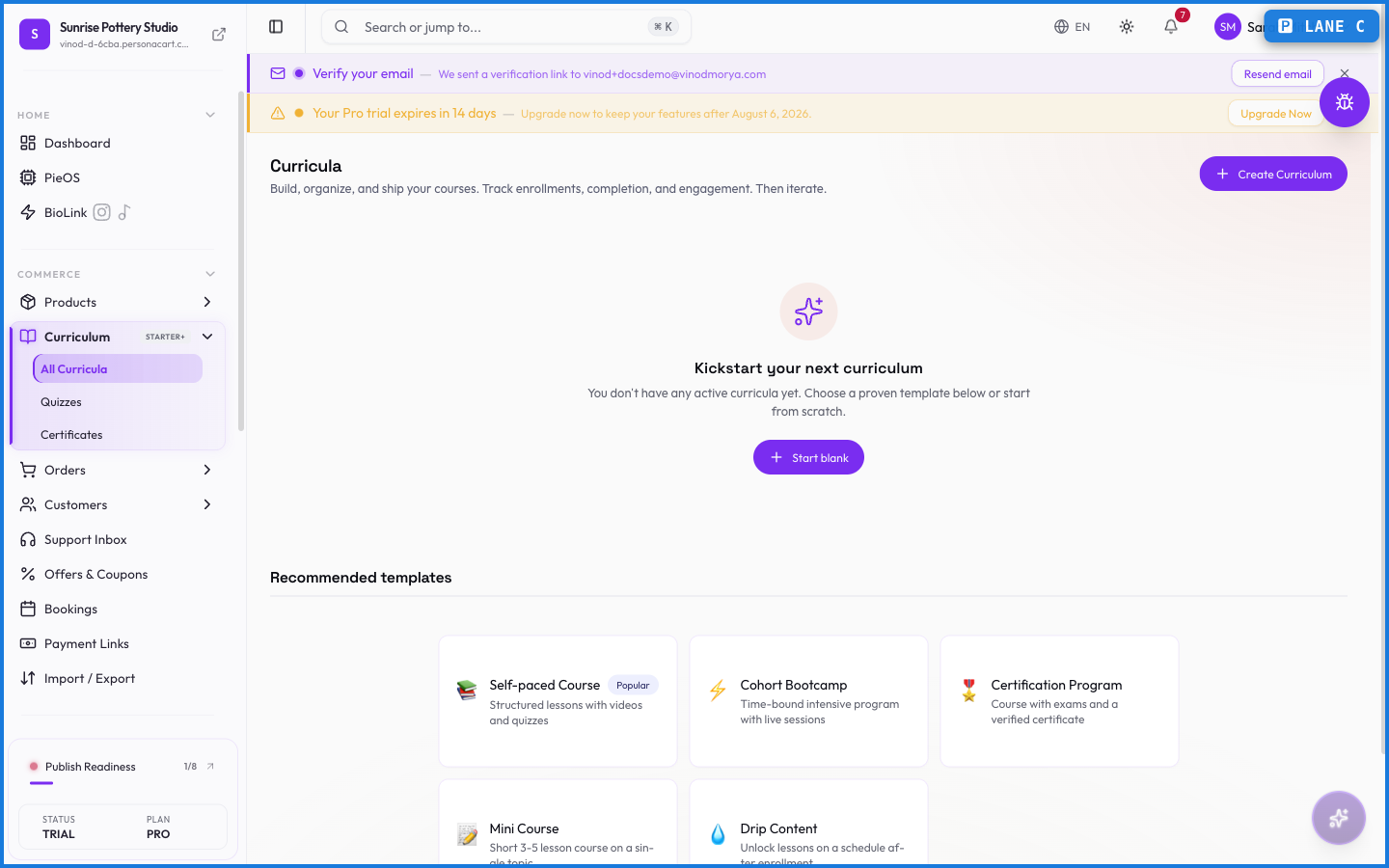
Where to find it
Sidebar → COMMERCE → Curriculum. The section also holds Quizzes and Certificates.
How it fits together
- A curriculum holds your lessons, grouped into modules.
- Quizzes check understanding along the way — see Quizzes.
- Certificates reward completion — see Certificates.
- A course product is what you sell. It links to one curriculum, and buying it grants access.
Building a course
Create a curriculum, add modules, and fill each module with lessons (video, text, downloads). Learners move through in order, and their progress is tracked so they can pick up where they left off. When the curriculum is ready, link it to a course product and publish.
What happens — and what doesn't
- A course product won't publish until a curriculum is linked to it. Build the curriculum first, connect it in the product editor, then publish.
- Learner progress is tracked per person, which is what makes completion, quizzes, and certificates work.
- Editing a published curriculum updates it for everyone enrolled — there's one living version, not a copy per student.
How do I sell a course?
Build a curriculum, then create a course product and link the curriculum to it. Buying the product grants access to the lessons. The course product won't publish until a curriculum is attached.
Do I need a paid plan for courses?
Yes. Curriculum tools are on a paid plan. Without it, the Curriculum page shows what upgrading would unlock.
Can learners track their progress?
Yes. Progress is recorded per learner, so they resume where they stopped — and it drives quizzes and completion certificates.
Every field on this screen
Every field for building course content — modules, lessons, and release. Read straight from the live app, so it matches what you see.
| Field | Type | What it accepts | What it does |
|---|---|---|---|
| Accepted Answers | Text | — | |
| Access Mode | Dropdown | — | Choices: Pass all quizzesPass final quiz onlyOpen (any order)Drip (scheduled release)Scheduled (time-based) |
| Age Group | Dropdown | — | |
| Border Color | Text | — | |
| Border Style | Dropdown | — | Choices: SolidDashedDoubleOrnateRoundedThickRibbonGradient |
| Border Width (px) | Number |
| |
| Brand Color | Text | — | |
| Certificate Title * | Text | — | e.g. e.g. Course Completion Certificate |
| Charge Renewal Fee | On/off | — | |
| Color | Dropdown | — | |
| Completion Requirement | Dropdown | — | Choices: Complete all lessonsPass all quizzesPass final quiz only |
| Content | Number | — | |
| Created | Text | — | |
| Curriculum * | Dropdown | — | |
| Curriculum Name * | Text | — | |
| Description | Long text | — | |
| Dynamic Field | Number | — | |
| Expected Answer Keywords | Text | — | e.g. Enter keywords separated by commas... |
| Font Size | Number |
| |
| Font Weight | Dropdown | — | Choices: NormalBold |
| Free Preview | On/off | — | |
| Generate with AI | On/off | — | |
| Grace Period | Number |
| |
| Height | Number |
| |
| Include Certificate | Long text | — | |
| Include Quizzes | On/off | — | |
| Include Video Scripts | On/off | — | |
| Issuer Name | Text | — | |
| Language | Dropdown | — | |
| Learning Objectives | Long text | — | |
| Lessons per Module | Slider | — | |
| Lifetime validity | On/off | — | |
| Minimum Passing Score (%) | Dropdown | — | |
| Module | Dropdown | — | Choices: No modules in this curriculum |
| Module Title | Text | — | |
| Number of Modules | Slider | — | |
| Option {index} | Text | — | |
| Options | Choice | — | |
| Place in Module | Dropdown | — | |
| Points | Number |
| |
| Position (%) | Number |
| |
| Public Verification Page | On/off | — | |
| Question Text | Number | — | |
| Questions per Quiz | Slider | — | |
| Quiz | Dropdown | — | |
| Renewal Enabled | Number | — | |
| Renewal Requires Re-assessment | On/off | — | |
| Renewal Window (days before expiry) | Number |
| |
| Require All Modules | On/off | — | |
| Require re-exam for expired | On/off | — | |
| Search students… | Text | — | |
| Shuffle | On/off | — | |
| Size (%) | Number |
| |
| Status | Dropdown | — | |
| Tags | Tags | — | e.g. Add tags... |
| Tags (comma-separated) | Text | — | e.g. e.g. beginner, marketing |
| Text Align | Dropdown | — | Choices: NormalBoldLeftCenterRightJustify |
| Title | Text | — | e.g. e.g. Module 1 Assessment |
| Topic / Subject * | Long text | — | |
| Trigger Type | Dropdown | — | |
| Type | Dropdown | — | Choices: Multiple ChoiceTrue/FalseShort Answer |
| URL | Text | — | e.g. https://example.com |
| Validity (months) | Number | — | e.g. 12 |
| Validity Period | Number |
| |
| Verification URL Format | Text |
| |
| Video Duration | On/off | — | |
| Width | Number |
|
67 fields, read from the live app. Which ones you see depends on the product type and your plan.
What this screen looks like in every state
| State | When you'll see it | What you see, and what to do |
|---|---|---|
| Loading | The screen is fetching your data | A skeleton in the shape of the finished page. It should be brief — if it persists, the load has failed rather than stalled. |
| Error | The data couldn't be loaded | A message with a retry. Retry first: most of these are a dropped request, not a broken store. If it repeats, the outage is upstream and reloading won't help. |
| No access | Your role doesn't include this screen | A permission notice instead of the page. An owner or admin can grant access under Settings → Team. |
When something goes wrong
These are the messages this screen can show you, and what each one means.
| If you see | What to do |
|---|---|
| AI service is busy right now. Please try again in a moment. No course was created, so a retry is safe. | The change didn't save. Retry — if it keeps failing, the request isn't reaching the server. |
| Certificate title is required | A required field is blank. Fill it in and save again. |
| Failed to create curriculum. Please try again. | The change didn't save. Retry — if it keeps failing, the request isn't reaching the server. |
| Please select a curriculum | Do what the message asks, then try again — it names exactly what's missing. |
| Please select a trigger type | Do what the message asks, then try again — it names exactly what's missing. |