Collections
Collections group products so buyers can browse by theme — "Mugs," "Tableware," "Classes." They power your shop's navigation and filters, and they can nest one level deep: a root collection like "Tableware" with sub-collections like "Bowls" and "Plates."
Where to find it
Sidebar → COMMERCE → Products, then the Collections tab.
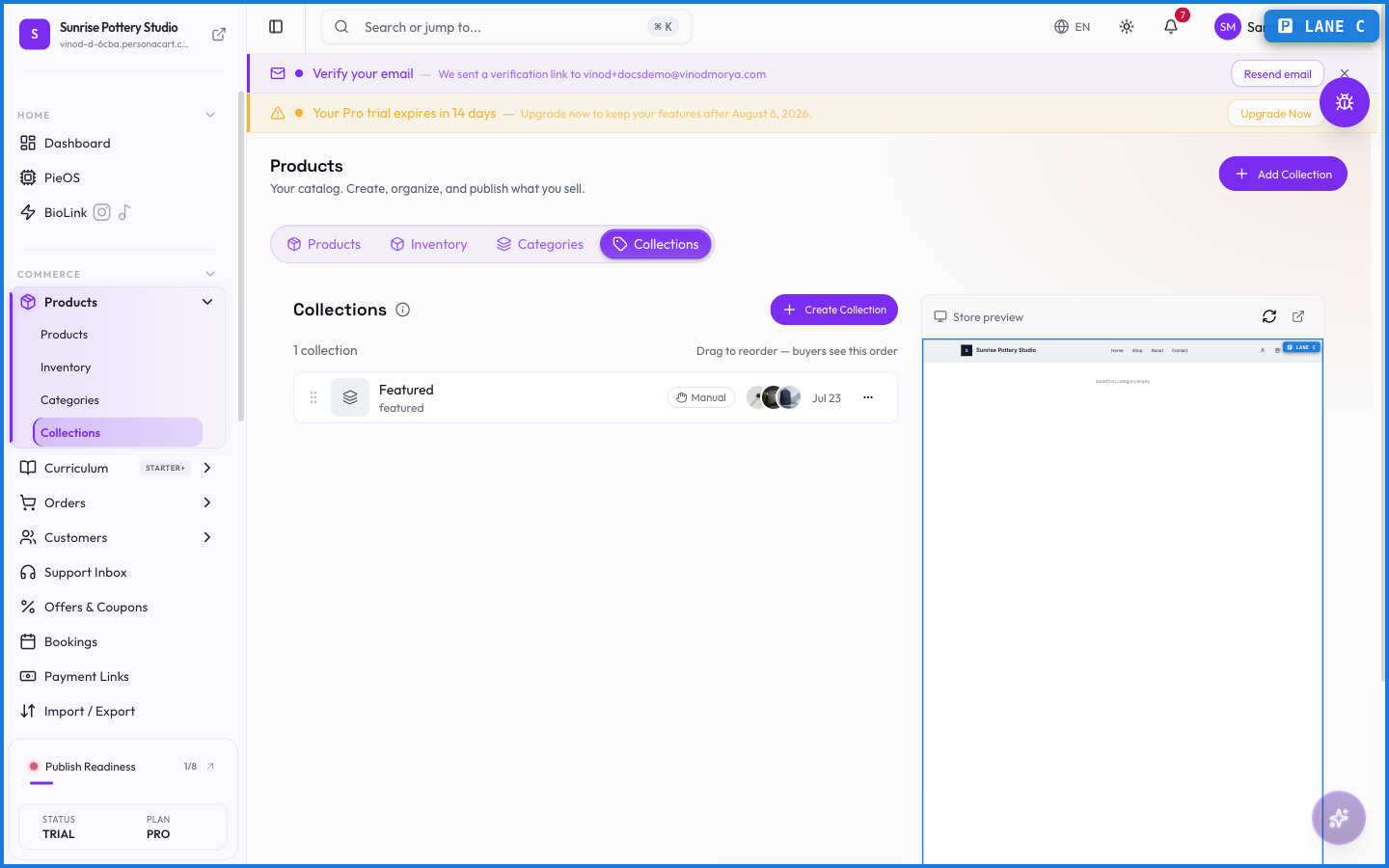
The hierarchy table
Three summary cards count your root collections, sub-collections, and total products across all of them. Below, the Collection Hierarchy table lists each collection with:
- A drag handle — drag rows to reorder. The order here is the order your storefront shows.
- The name, indented when it's nested, with a product-count badge.
- The slug (its URL segment), the parent (or "Root"), created/updated dates, and edit/delete buttons.
Creating a collection
Click Create Collection. You give it a name, a slug (pre-filled from the name), and optionally a parent collection to nest it under. Products join a collection from the product editor, not from here — a collection is the shelf, products decide which shelves they sit on.
What happens — and what doesn't
- Collections are shared with your storefront automatically — create one and it's available to your shop pages and menus right away.
- Nesting goes one level deep: roots can hold sub-collections; sub-collections can't hold their own children.
- Deleting a collection doesn't delete its products — they just leave that shelf.
- Reordering by drag changes storefront display order immediately.
How do I add products to a collection?
From the product editor: open the product, and assign it to one or more collections there. The Collections tab manages the shelves themselves, not their contents.
Can collections be nested?
One level: a root collection can contain sub-collections, and that's the limit. It keeps storefront navigation simple.
What happens to products when I delete a collection?
Nothing — products are never deleted with a collection. They simply no longer belong to it.
Every field on this screen
Every control on this tab, read straight from the live app.
| Field | Type | What it accepts | What it does |
|---|---|---|---|
| Banner heading | Text | — | |
| Banner subheading | Text | — | |
| Description | Long text | — | |
| Name | Long text | — | |
| Slug | Long text | — | |
| Status | Dropdown | — | Choices: ActiveThis collection is saved but hidden from your storefront.This collection is hidden and no longer active. |
| Type | Choice | — |
7 fields, read from the live app. Which ones you see depends on the product type and your plan.
What this screen looks like in every state
| State | When you'll see it | What you see, and what to do |
|---|---|---|
| Loading | The screen is fetching your data | A skeleton in the shape of the finished page. It should be brief — if it persists, the load has failed rather than stalled. |
| Error | The data couldn't be loaded | A message with a retry. Retry first: most of these are a dropped request, not a broken store. If it repeats, the outage is upstream and reloading won't help. |
| No access | Your role doesn't include this screen | A permission notice instead of the page. An owner or admin can grant access under Settings → Team. |
When something goes wrong
These are the messages this screen can show you, and what each one means.
| If you see | What to do |
|---|---|
| All selected products are already hidden from storefront | Retry the action. If it keeps happening, contact support with what you were doing. |
| All selected products are already visible on storefront | Retry the action. If it keeps happening, contact support with what you were doing. |
| Couldn't load the rest of your inventory. | Retry the action. If it keeps happening, contact support with what you were doing. |
| Couldn't save the new order | The change didn't save. Retry — if it keeps failing, the request isn't reaching the server. |
| Couldn’t save the new order | The change didn't save. Retry — if it keeps failing, the request isn't reaching the server. |
| Enter a valid non-negative number | Do what the message asks, then try again — it names exactly what's missing. |
| Enter a valid non-zero quantity | Do what the message asks, then try again — it names exactly what's missing. |
| Enter a valid quantity | Do what the message asks, then try again — it names exactly what's missing. |
| Failed to archive … product{count, plural, one {} other …} | The change didn't save. Retry — if it keeps failing, the request isn't reaching the server. |
| Failed to create collection | The change didn't save. Retry — if it keeps failing, the request isn't reaching the server. |
| Failed to create product | The change didn't save. Retry — if it keeps failing, the request isn't reaching the server. |
| Failed to delete product | The change didn't save. Retry — if it keeps failing, the request isn't reaching the server. |
| Failed to delete … product{count, plural, one {} other …} | The change didn't save. Retry — if it keeps failing, the request isn't reaching the server. |
| Failed to duplicate product | That value is already used. Pick a different one. |
| Failed to publish … product{count, plural, one {} other …} | The change didn't save. Retry — if it keeps failing, the request isn't reaching the server. |
| Failed to update status | The change didn't save. Retry — if it keeps failing, the request isn't reaching the server. |
| Failed to update stock | The change didn't save. Retry — if it keeps failing, the request isn't reaching the server. |
| Failed to update … product{count, plural, one {} other …} | The change didn't save. Retry — if it keeps failing, the request isn't reaching the server. |
| Invalid value | The value isn't in the expected format. Check it against the field's rules above. |
| No draft products selected to publish | Retry the action. If it keeps happening, contact support with what you were doing. |
| No items selected | Retry the action. If it keeps happening, contact support with what you were doing. |
| No products imported | Retry the action. If it keeps happening, contact support with what you were doing. |
| No products to archive | Retry the action. If it keeps happening, contact support with what you were doing. |
| No valid rows found. CSV needs columns: sku/product_name and quantity. | The value isn't in the expected format. Check it against the field's rules above. |