Abandoned carts
When a buyer adds something to their cart and leaves without paying, that cart shows up here. PersonaCart can email them a nudge to come back — and this page tracks how well that's working.
Where to find it
Sidebar → COMMERCE → Orders, then the Abandoned Carts tab.
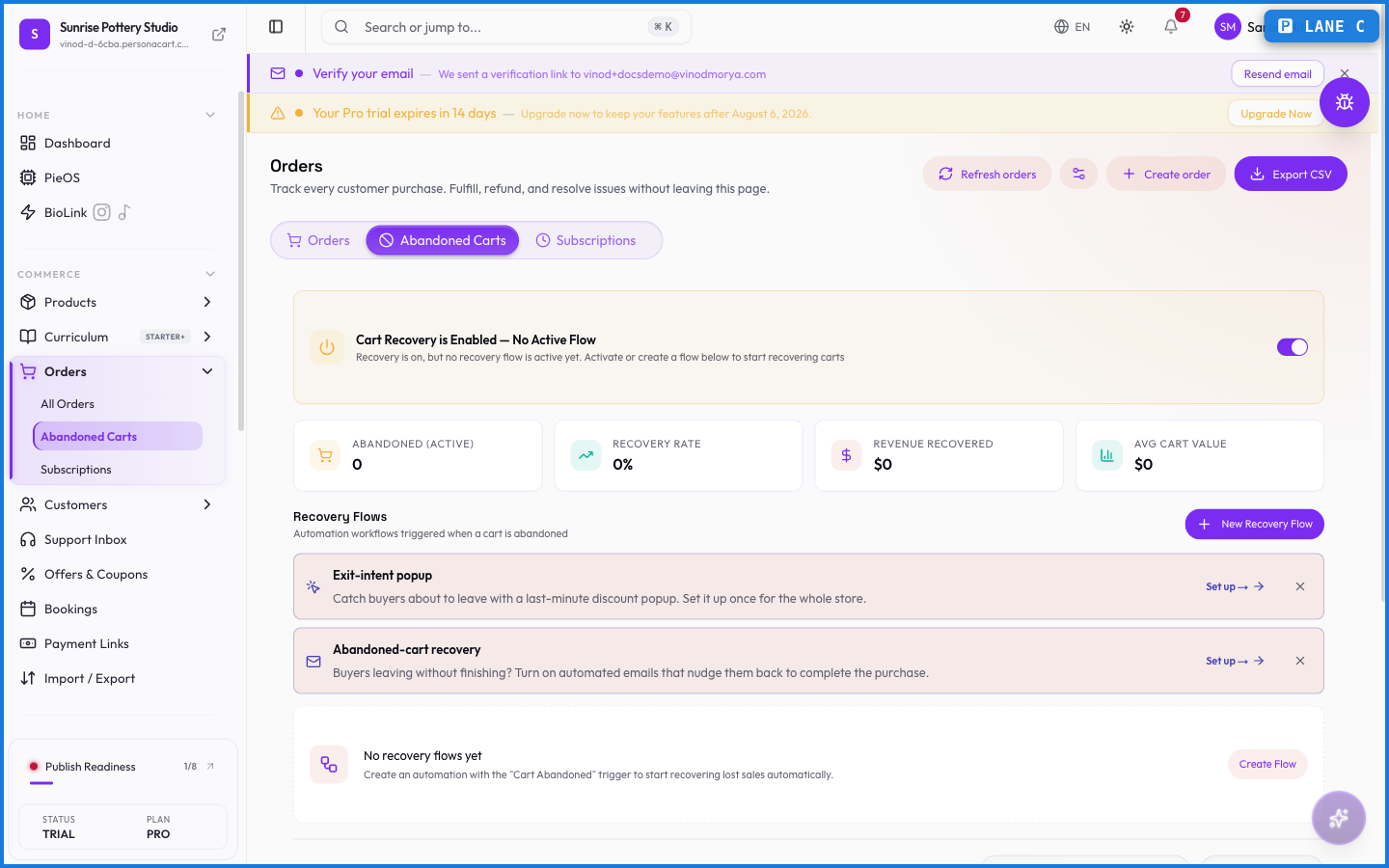
The four cards
- Abandoned (Active) — carts currently abandoned or mid-recovery, with the 7-day change.
- Recovery Rate — the share of abandoned carts that came back and bought.
- Revenue Recovered — the dollar value those recovered carts brought in.
- Avg Cart Value — average value across abandoned carts.
The carts table
One row per abandoned cart: the customer, how many items, the cart's value, its stage, how many recovery emails have gone out, and when it was abandoned.
Stage is how cold the cart has gone since it was left:
- Fresh — just abandoned. The best odds of getting them back.
- Warm — still recent.
- Cooling — going quiet.
- Cold — old enough that recovery is unlikely.
Search by name or email, and narrow to the last 24 hours, 7, 30 or 90 days, or all time.
Recovery flows
Recovery isn't a single setting — it's an automation. A recovery flow is a workflow triggered when a cart is abandoned, and it's what actually sends the emails.
At the top of the page a banner tells you exactly where you stand:
- Cart Recovery is Active — a flow is running and carts are being recovered.
- Cart Recovery is Enabled — No Active Flow — recovery is switched on, but nothing is set up to act. Nothing sends in this state.
- Cart Recovery is Disabled — off entirely.
Create one with New Recovery Flow, or build an automation using the Cart Abandoned trigger.
What happens — and what doesn't
- A cart is only "abandoned" once it has items and the buyer leaves without completing checkout — an empty cart is never counted.
- Expired carts release their reserved stock back to inventory, so held units don't sit locked forever.
- Recovery emails only fire when you have the buyer's email (a logged-in buyer, or one who reached the contact step) AND an active recovery flow exists. Enabled with no active flow sends nothing.
- Recovered carts turn into normal orders — the recovery just got them there.
How does cart recovery work?
When a buyer leaves items in their cart, PersonaCart can email them a link to finish. You control whether these send, how many, and the timing from Recovery Settings.
What does 'Expired' mean for a cart?
The cart timed out without being recovered. Its reserved inventory is released back to your stock so those units are available to other buyers.
Why don't all abandoned carts get a recovery email?
Recovery needs the buyer's email address and the recovery feature switched on. Anonymous carts with no contact info can't be emailed.
Every field on this screen
Every control here, read straight from the live app.
| Field | Type | What it accepts | What it does |
|---|---|---|---|
| Search name or email | Text | — |
1 field, read from the live app. Which ones you see depends on the product type and your plan.
What this screen looks like in every state
| State | When you'll see it | What you see, and what to do |
|---|---|---|
| Empty | Nothing matches the filters or search you have applied | “No orders match your filters” — the data may well exist; clear the filters or widen the date range to see it. |
| Loading | The screen is fetching your data | A skeleton in the shape of the finished page. It should be brief — if it persists, the load has failed rather than stalled. |
| Error | The data couldn't be loaded | A message with a retry. Retry first: most of these are a dropped request, not a broken store. If it repeats, the outage is upstream and reloading won't help. |
| No access | Your role doesn't include this screen | A permission notice instead of the page. An owner or admin can grant access under Settings → Team. |
This screen has more than one empty state depending on what you're looking at: “No orders match your filters”, “No orders yet”.
When something goes wrong
These are the messages this screen can show you, and what each one means.
| If you see | What to do |
|---|---|
| Add at least one product | Do what the message asks, then try again — it names exactly what's missing. |
| Could not create the order | The change didn't save. Retry — if it keeps failing, the request isn't reaching the server. |
| Couldn't complete that action. Please try again. | Retry the action. If it keeps happening, contact support with what you were doing. |
| Enter a valid customer email | Do what the message asks, then try again — it names exactly what's missing. |
| Failed to fulfill … orders | The change didn't save. Retry — if it keeps failing, the request isn't reaching the server. |
| Failed to update … orders | The change didn't save. Retry — if it keeps failing, the request isn't reaching the server. |
| No eligible orders to mark as shipped (must be confirmed or processing) | Retry the action. If it keeps happening, contact support with what you were doing. |
| Order created, but the pay-link could not be generated. | The change didn't save. Retry — if it keeps failing, the request isn't reaching the server. |